Table of Contents >> Show >> Hide
- What Is a Wolfbox Mirror Dash Cam?
- Key Features That Make the Wolfbox Gadget Stand Out
- Who Should Consider a Wolfbox Mirror Dash Cam?
- Installation: Easy Enough, But Not Always Plug-and-Play
- What to Look for Before Buying
- Pros and Cons of a Wolfbox Mirror Dash Cam
- Is It Better Than a Traditional Dash Cam?
- Real-World Experiences: What It Feels Like to Drive With a Wolfbox Mirror Dash Cam
- Conclusion: A Smart Mirror Upgrade That Actually Makes Sense
Most car gadgets promise to “change the way you drive,” which usually means they add another blinking light to your dashboard and one more cable to hide badly under the floor mat. The Wolfbox mirror dash cam is different. Instead of asking for windshield real estate like a tiny tech billboard, it slips over your existing rearview mirror and transforms it into a wide digital display, front-facing dash cam, rear camera monitor, and driving evidence machine.
In simple terms, this clever Wolfbox gadget turns your car mirror into a dash cam by combining a touchscreen mirror display with front and rear video recording. Depending on the model, such as the popular Wolfbox G840S, G930, or G900 Pro, you may get features like 4K front recording, rear camera support, GPS tracking, loop recording, parking monitoring, night vision, Wi-Fi file transfer, and reverse-assist guidelines. That is a lot of technology hiding in the one place drivers already check every few seconds.
For older vehicles, trucks, SUVs, vans, rideshare cars, and daily commuters, a Wolfbox rearview mirror camera can feel like a modern safety upgrade without buying a new car. It does not magically eliminate blind spots or turn you into a stunt driver, but it can give you a cleaner view, record important road moments, and make backing up less of a guessing game. Think of it as your mirror going to night school and coming back with a degree in surveillance.
What Is a Wolfbox Mirror Dash Cam?
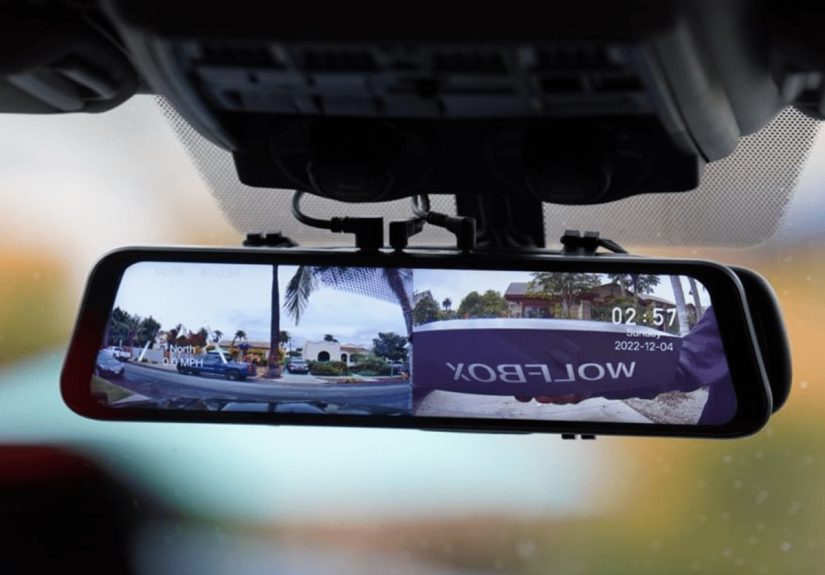
A Wolfbox mirror dash cam is a digital rearview mirror system that mounts over your existing mirror. The unit usually has a built-in front camera facing the road, while a separate rear camera mounts near the back window or license plate area. The mirror itself becomes a touchscreen display, allowing you to view the rear camera, the front camera, or both, depending on the model and settings.
Unlike a standard dash cam that sits on your windshield, a mirror dash cam blends into the car’s interior more naturally. The screen is larger than most small dash cam displays, which makes it easier to use for reversing, checking traffic behind you, or reviewing settings. On some Wolfbox models, the display stretches across a 10-inch or 12-inch screen, giving drivers a panoramic-style view that feels much more generous than a traditional mirror.
Why the Mirror Design Matters
The biggest advantage is space. Many drivers do not want a camera hanging near the windshield, especially if they already have toll tags, phone mounts, parking permits, or advanced driver-assistance sensors near the glass. A mirror dash cam uses a location that already exists. It also keeps the screen closer to your natural line of sight, which can make the rear camera view feel intuitive.
The second advantage is visibility. A digital rearview mirror can provide a clearer view when your cargo area is full, your rear seats are occupied, or your back window is small. For truck owners, delivery drivers, pet parents, and anyone who has ever packed the trunk like they are fleeing the country, this is a practical benefit.
Key Features That Make the Wolfbox Gadget Stand Out
Wolfbox mirror dash cams vary by model, but the core appeal is similar: high-resolution recording, a large touch display, and front-and-rear coverage in one package. Here are the features that matter most when deciding whether this upgrade belongs in your car.
4K Front Recording for Clearer Road Evidence
Many Wolfbox mirror dash cam models offer 4K front recording, which can capture sharper details than basic 1080p cameras. In real-world driving, that extra resolution can help with reading road signs, documenting traffic behavior, and preserving more detail in daylight footage. While no dash cam can guarantee perfect license plate capture in every situation, higher resolution generally gives you more visual information to work with.
This matters most during fast-moving situations. A sudden lane change, a rolling stop, a tire blowout from the truck ahead, or a “did that really just happen?” moment can be recorded automatically. When the footage is clear, the dash cam becomes more than a gadget; it becomes a calm, unbiased witness that does not panic, blink, or misremember the color of the other car.
Rear Camera Support for Better Backup Awareness
The rear camera is one of the biggest reasons people choose a Wolfbox rearview mirror camera. It can display what is behind your vehicle directly on the mirror screen, which helps when reversing into a parking space, backing out of a driveway, or navigating tight areas. Some models include parking assistance lines, giving you a visual guide while reversing.
Newer vehicles are required to include rear visibility technology, but many older cars lack a factory backup camera. A mirror dash cam can give those vehicles a useful update. Even in cars that already have a basic backup camera, the Wolfbox system may offer recording capability and a larger display, making it more versatile than a simple reverse-only camera.
Touchscreen Control That Feels Familiar
A large touchscreen mirror is easier to use than tiny buttons tucked behind a small dash cam. Drivers can swipe between camera views, adjust the displayed angle, change settings, or review clips more comfortably. The interface can vary between models, but the general experience is closer to using a phone or tablet than operating an old-school car accessory.
That said, the best time to change settings is before driving. A dash cam should help reduce stress, not turn your commute into a touchscreen talent show. Set your preferred display, brightness, recording mode, and angle while parked.
Loop Recording So Storage Does Not Become a Chore
Loop recording is a must-have dash cam feature. Instead of stopping when the memory card fills up, the camera overwrites older unlocked footage with new clips. This allows the system to keep recording without constant manual file management. Important videos can be locked manually or automatically if the G-sensor detects an impact.
For everyday drivers, loop recording is the difference between owning a useful camera and owning a tiny video hoarder. You do not want to spend Sunday afternoon deleting clips of your grocery trips from three months ago. The camera handles routine footage in the background, and you save only what matters.
G-Sensor and Emergency Recording
Many Wolfbox dash cams include a G-sensor that detects sudden movement, bumps, or impacts. When triggered, the system can lock the relevant footage so it is not overwritten during normal loop recording. This is helpful after collisions, hard braking, pothole impacts, or parking-lot bumps.
However, sensitivity settings matter. If the G-sensor is too sensitive, rough roads may create too many locked clips. If it is too relaxed, it may miss smaller incidents. The best approach is to test the setting during normal driving and adjust it until the camera behaves like a helpful witness rather than a nervous squirrel.
Parking Monitoring for When the Car Is Off
Parking mode is one of the most attractive features for city drivers, apartment dwellers, and anyone who parks in busy lots. With the correct setup, usually involving a hardwire kit, the camera can monitor your vehicle while parked and record when it detects motion or impact.
This can be useful for hit-and-run incidents, door dings, suspicious movement, or unexplained bumper scratches that somehow appear while everyone in the neighborhood claims innocence. Parking mode does require proper installation and battery protection, so it is worth following the manufacturer’s instructions carefully or hiring a professional installer if you are not comfortable with vehicle wiring.
GPS and Wi-Fi Convenience
Some Wolfbox models include GPS support, which can add location, route, and speed data to recorded footage. This can be helpful when reviewing a trip or documenting where an incident occurred. Wi-Fi support can make it easier to transfer videos to a smartphone through the compatible app, reducing the need to remove the memory card every time you want to save a clip.
These features are convenient, but they should be used thoughtfully. If you share footage publicly, consider whether speed, location, audio, or private conversations are included. Dash cam videos are useful, but oversharing personal data online is still a hobby best left to people who also post photos of their boarding passes.
Who Should Consider a Wolfbox Mirror Dash Cam?
A Wolfbox mirror dash cam is especially appealing for drivers who want a cleaner, integrated-looking setup. It is not the smallest dash cam solution, but it is one of the most practical if you want a large screen and rear camera visibility.
Older Car Owners
If your vehicle predates modern backup camera requirements, a Wolfbox mirror camera can add a feature that feels factory-inspired. You get a rear view display, front recording, and often additional safety-oriented tools without replacing the head unit or dashboard.
Truck, SUV, and Van Drivers
Larger vehicles often have bigger blind spots, longer bodies, and more challenging rear visibility. A rear camera displayed in the mirror can make backing up and lane awareness feel less stressful. This is particularly helpful when carrying cargo, towing, or driving a vehicle with small rear windows.
Rideshare and Delivery Drivers
People who drive for work spend more time on the road, which increases exposure to accidents, disputes, and unpredictable traffic. A front and rear dash cam system can provide useful documentation. Drivers who transport passengers should also pay attention to local rules about audio recording, consent, and privacy.
Commuters and Road-Trippers
Daily commutes produce plenty of “you won’t believe what happened” moments, while road trips add unfamiliar roads, rental parking lots, and long hours behind the wheel. A mirror dash cam can quietly record the boring miles and save the exciting ones, including scenic drives, wildlife crossings, or the moment a mattress on the highway decides it wants to be airborne.
Installation: Easy Enough, But Not Always Plug-and-Play
Installing a Wolfbox mirror dash cam is usually more involved than attaching a basic front-only camera. The mirror unit typically straps over the existing rearview mirror. The front camera is built into the mirror body, while the rear camera must be routed toward the back of the vehicle. Power normally comes from the 12V outlet unless you choose a hardwire kit for parking monitoring.
The rear camera cable is the part that requires patience. It often needs to be tucked along the headliner, pillar trim, weather stripping, or floor edges. In sedans, SUVs, hatchbacks, and trucks, the best routing path can differ. If the rear camera is installed outside near the license plate, weatherproofing and cable routing become even more important.
Installation Tips Before You Start
- Check that the mirror unit fits over your existing mirror without blocking sensors or buttons.
- Clean the mirror and windshield area before mounting the device.
- Test the rear camera view before permanently hiding cables.
- Use proper trim tools instead of attacking your interior with a screwdriver and optimism.
- Consider professional installation if you want parking mode hardwired neatly.
What to Look for Before Buying
Before choosing a Wolfbox mirror dash cam, compare the model specifications carefully. The G840S, G930, and G900 Pro are not identical. Screen size, rear camera resolution, included memory card capacity, sensor type, Wi-Fi speed, GPS support, voice control, and parking mode requirements can vary.
Screen Size
A 12-inch screen can feel luxurious, especially in larger vehicles, but it may be too wide for compact cars with tight mirror areas or bulky factory mirror housings. A 10-inch unit may fit better in smaller cabins. Measure first. Your mirror should not become a sun visor with ambitions.
Rear Camera Resolution
Front 4K recording is impressive, but do not ignore rear camera quality. Some systems use 1080p rear cameras, while premium versions may offer higher rear resolution. Since rear-end collisions and parking incidents are common reasons for installing a dash cam, the rear camera deserves attention.
Memory Card Support
High-resolution video uses more storage. Look for the included card size and the maximum supported capacity. A high-endurance microSD card is recommended for dash cams because constant rewriting can wear out standard cards faster.
Heat and Reliability
Cars get hot. Very hot. A dash cam lives in one of the harshest electronics environments most people own. Choose reputable hardware, avoid bargain-basement memory cards, and update firmware when the manufacturer provides improvements. Reliability matters more than flashy specs when the footage is needed after an incident.
Pros and Cons of a Wolfbox Mirror Dash Cam
Pros
- Combines rearview mirror, front dash cam, and rear camera display in one system.
- Large touchscreen is easier to view than a small dash cam screen.
- Front and rear recording can provide more complete driving evidence.
- Useful upgrade for older vehicles without factory backup cameras.
- Features such as GPS, Wi-Fi, parking mode, and loop recording add daily convenience.
Cons
- Installation can be more complex than a simple windshield dash cam.
- Large mirror units may not fit every vehicle perfectly.
- Rear camera wiring takes time to route cleanly.
- Parking mode may require a separate hardwire kit.
- Touchscreen settings should be adjusted while parked, not while driving.
Is It Better Than a Traditional Dash Cam?
A Wolfbox mirror dash cam is better for drivers who want a large screen, rear camera view, and integrated mirror-style design. A traditional dash cam may be better for someone who wants the smallest possible device, the easiest installation, or a front-only recording setup.
The real decision comes down to your vehicle and driving habits. If you drive a compact car and only want basic incident recording, a small windshield camera may be enough. If you drive a truck, SUV, older sedan, work van, or family car and want front-and-rear coverage with a big display, the Wolfbox design makes a lot of sense.
Real-World Experiences: What It Feels Like to Drive With a Wolfbox Mirror Dash Cam
The first thing most drivers notice after installing a mirror dash cam is how different the rear view feels. A traditional mirror shows whatever the back window allows. If the rear seats are full, the cargo area is stacked, or the window is small, that view can be limited. A rear camera changes the relationship. Suddenly, the mirror is not just reflecting the cabin; it is showing a camera-fed view from the back of the vehicle. The result can feel wider, brighter, and more useful, especially in larger vehicles.
During daytime driving, the experience is usually smooth. The wide display makes it easy to glance at traffic behind you, and the front camera records the road without asking for attention. Once the system is set up, it becomes part of the drive. You do not think about the camera every minute. It simply works in the background, like a quiet passenger who never changes the radio station.
Parking is where the Wolfbox gadget often earns its keep. Backing into a narrow space feels less like a game of bumper roulette. The rear camera view can help you judge distance and alignment, especially when reversing near low objects, curbs, garage walls, or shopping carts that appear to have no owner and unlimited confidence. Drivers of older cars may appreciate this most because it gives a modern backup-camera feel without replacing the vehicle.
Night driving is more mixed but still valuable. A good mirror dash cam can improve visibility, especially with headlights behind you or streetlights nearby. However, every camera has limits. Rain, glare, dirty lenses, fog, and extreme darkness can reduce clarity. The best habit is simple: keep both cameras clean. A rear camera covered in road grime is not a safety feature; it is a documentary about dirt.
The recording experience is reassuring. If a driver cuts across three lanes, a delivery truck drops debris, or someone reverses into your parked car, you are not depending entirely on memory. You have footage. That does not mean every clip will be perfect, but it gives you a starting point for insurance conversations, repair disputes, or personal review. It can also make you a calmer driver because you know the camera is documenting the road, not your blood pressure.
There are a few learning curves. The screen brightness may need adjustment at night. The G-sensor may need tuning if rough roads trigger too many emergency files. The rear camera angle may take a few tries to get just right. And if you use parking monitoring, the hardwire setup should be done carefully so the vehicle battery is protected. These are not deal-breakers, but they are part of owning a more advanced dash cam system.
After a week or two, the biggest compliment is that the gadget begins to feel normal. You stop admiring the screen and simply rely on it. That is usually the sign of good car tech. It does not beg for attention. It solves a problem, records what matters, and stays out of the way until needed.
Conclusion: A Smart Mirror Upgrade That Actually Makes Sense
The Wolfbox mirror dash cam is a clever upgrade because it improves a part of the car you already use constantly. By turning the rearview mirror into a digital display and dash cam system, it adds front recording, rear visibility, backup assistance, and optional parking protection without cluttering the dashboard. It is especially useful for older vehicles, larger cars, road-trip machines, delivery vehicles, and drivers who want more confidence on the road.
It is not perfect for everyone. Installation takes planning, vehicle fit matters, and parking mode may require extra wiring. But for drivers who want one gadget that blends safety, convenience, and evidence recording into a single mirror-mounted package, Wolfbox has created a practical solution that feels smarter than the average car accessory. In a world full of gadgets that mostly beep, blink, and demand app updates, this one has a clear job: help you see more, record more, and drive with fewer “I wish I had footage” regrets.
Note: Product features, included accessories, pricing, and bundles can change by model and retailer. Before publishing or buying, verify the exact Wolfbox model specifications, memory card capacity, rear camera resolution, warranty details, and installation requirements.