Table of Contents >> Show >> Hide
- Before You Reset: One Small, Important Reality Check
- Which Reset Method Does Your Accord Use?
- Quick Way #1: Reset Oil Life Using Steering Wheel Controls (Most Common)
- Quick Way #2: Reset Oil Life from the Touchscreen (Infotainment Method)
- Quick Way #3: Reset Oil Life with the Dash Trip/SEL/RESET Knob (Older Accords)
- Troubleshooting: When the Oil Life Won’t Reset (Because Cars Have Feelings)
- Oil Life Tips That Actually Help (Not Just “Change Oil Sometime”)
- FAQ: Quick Answers People Actually Want
- Conclusion
- Extra : Real-World Experiences Resetting Accord Oil Life (So You Don’t Lose Your Mind)
Your Honda Accord is smart enough to track oil life… but not smart enough to know you actually changed the oil
unless you tell it. So if your dash is still screaming for an oil change after you’ve already done it, don’t panic.
Your Accord isn’t judging youit’s just waiting for the reset command like a very polite robot.
Below are three quick, proven ways to reset the Honda Accord oil life (a.k.a. the
Maintenance Minder oil reminder), based on common Honda procedures across multiple U.S. service guides
and owner documentation. Pick the method that matches your dash and you’ll be back to 100% oil life
in about a minutesometimes faster than it takes to find the 10mm socket you just had in your hand.
Before You Reset: One Small, Important Reality Check
Resetting the oil life indicator is meant to be done after an oil change. Yes, your Accord will let
you reset it even if the oil is older than your group chat. But doing that can make you miss real maintenance timing,
especially if your car is also tracking other service items (filters, tire rotation, transmission fluid, etc.).
What “Oil Life” Actually Means (and Why It’s Not Just Mileage)
Honda’s oil life system typically displays a percentage that drops from 100% toward 0% based on
driving conditions (stop-and-go traffic, cold starts, long highway runs, temperature, and time), not just miles.
That’s why two people with the “same” Accord can hit service reminders at different times.
When Honda Usually Starts Nagging You
- 15% oil life: Service due soon (aka “schedule it now before you forget”).
- 5% oil life: Service due now (aka “your car is now officially anxious”).
- 0% oil life: Service past due (aka “your Accord is disappointed, not angry”).
Which Reset Method Does Your Accord Use?
Honda has used a few different interfaces over the years. You don’t need your exact model year to figure this out
just match what you see:
-
Steering wheel buttons + driver display: You can scroll menus on the gauge cluster using arrows,
a selector wheel, or “Home/Menu/Enter” buttons. -
Touchscreen infotainment reset: You can reset oil life through the center screen under
Settings/Vehicle/Maintenance. -
Dash knob/button reset: You have a SEL/RESET or TRIP knob/button
near the speedometer/odometer area.
Also: for push-button start Accords, you typically want the car in ON mode without starting the engine.
That usually means pressing the Start button twice without your foot on the brake. For key ignition
Accords, turn the key to ON (II) without starting the engine.
Quick Way #1: Reset Oil Life Using Steering Wheel Controls (Most Common)
If your Accord has a driver information screen you can control from the steering wheel, this is usually the fastest,
cleanest method. It’s also the one most people use on newer Accords with the Maintenance Minder on the gauge display.
Steps (Typical Newer Accords with a “Home” Button + Selector Wheel)
- Turn the car to ON (engine off). For push-start: press Start twice without pressing the brake.
- Press the Home (or Menu) button on the steering wheel to open the main menu on the driver display.
- Scroll to the wrench icon (Maintenance) using the selector wheel or arrows, then press to select it.
- You should see the oil life percentage and any maintenance codes/items due.
- Press and hold the selector/Enter button for about 10 seconds until the reset screen appears.
- Choose Oil Life (or All Due Items) and confirm the reset.
- Verify the oil life returns to 100%.
Steps (Many 2013–2017-Style Displays with “Vehicle Settings”)
- Switch power to ON (engine off).
- Use the steering wheel arrows to scroll to Vehicle Settings or Maintenance.
- Select Oil Life.
- Press and hold Enter (or the selector) until the reset option shows.
- Confirm reset; check that the oil life jumps to 100%.
Pro tip: If you see options like “Reset Oil Life” vs “Reset All,” choose wisely. “Reset All” can wipe
other due items toogreat if you truly did everything, not great if you only changed oil and still need tire rotation.
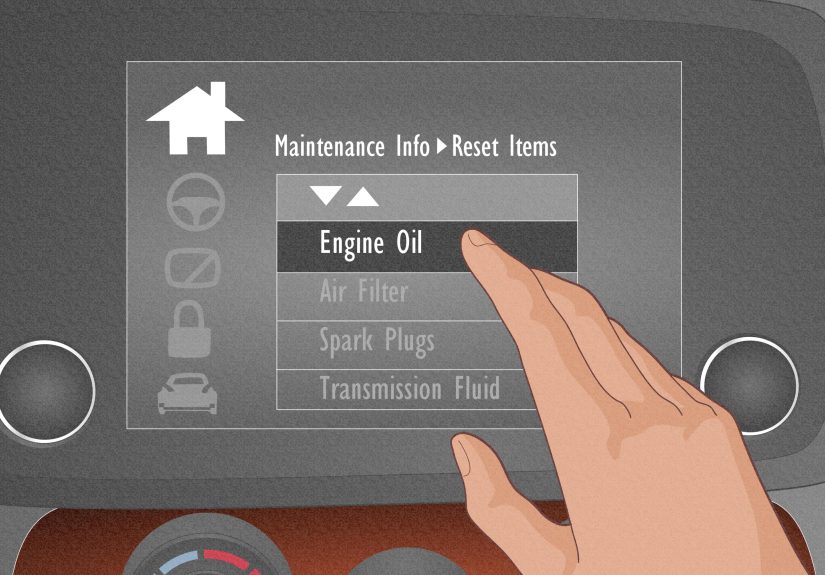
Quick Way #2: Reset Oil Life from the Touchscreen (Infotainment Method)
Some Accord trims make this ridiculously easy through the center displayespecially if the car’s menus are more
touchscreen-focused. The exact wording can vary slightly by year, but the path is usually consistent.
Steps (Common Touchscreen Menu Path)
- Turn the car to ON (engine off).
- On the infotainment screen, go to Home.
- Tap Settings.
- Tap Vehicle (or Vehicle Settings).
- Find Maintenance Info (sometimes called Maintenance Minder).
- Select Reset or Reset Items.
- Choose Oil Life or All Due Items, then confirm.
- Confirm oil life reads 100%.
If you can’t find “Maintenance Info”: Don’t assume you’re doomed. Some systems tuck it behind a
“Vehicle” tab, some hide it under “Info,” and some won’t show it unless the car is fully in ON mode (not just ACC).
Quick Way #3: Reset Oil Life with the Dash Trip/SEL/RESET Knob (Older Accords)
If your Accord has a physical knob/button near the speedometer that toggles the odometer/trip meter, this is your
method. Many 2008–2012-era Accords (and some others) use a simple “hold-until-it-blinks” routine.
Steps (Classic SEL/RESET / Trip Knob Reset)
- Turn the ignition to ON (engine off).
-
Press the SEL/RESET (or TRIP) knob/button repeatedly until you see
Engine Oil Life or the oil life percentage. - Press and hold the knob/button for about 10 seconds until the oil life starts blinking.
- Release, then press and hold again for about 5 seconds (on many models) to confirm the reset.
- Oil life should reset to 100%.
If your display shows maintenance codes along with oil life, you may see them blink too. That’s normal. The car is
basically asking, “Are you sure?”like it’s seen people reset things for emotional support before.
Troubleshooting: When the Oil Life Won’t Reset (Because Cars Have Feelings)
1) You’re in ACC, Not ON
Accessories mode powers the radio and screen, but may not allow maintenance resets. Switch to full ON
mode (engine off).
2) You’re Not on the Oil Life Screen
On knob/button systems, you must be showing the oil life screennot the trip meterbefore holding the button. On
steering wheel systems, you usually need the wrench/maintenance screen open.
3) You Didn’t Hold the Button Long Enough
Honda loves “press and hold.” Some resets require a long press to enter reset mode, then another hold to confirm.
If you let go too early, nothing happens. Think of it like microwaving popcorn: you can’t quit the process mid-drama.
4) You Reset the Wrong Thing
If you reset “All Due Items” when you only meant to reset oil life (or vice versa), your maintenance reminders may
look odd afterward. Go back in and verify which items are active.
5) The Reminder Comes Back Immediately
If the oil life returns to a low number right after resetting, double-check that you confirmed the reset. If it still
persists, it’s worth cycling the ignition off, waiting 10 seconds, and trying again. In rare cases, a system glitch
or low battery can cause weird display behavior.
Oil Life Tips That Actually Help (Not Just “Change Oil Sometime”)
Don’t Treat 0% Like a Challenge
The Maintenance Minder is designed to help you avoid excessive wear. Waiting past 0% isn’t a badge of honorit’s more
like playing “How long can I ignore my dentist?” with an engine.
Keep a Simple Maintenance Log
Whether you DIY or use a shop, jot down the date, mileage, and oil type. If you sell the car, this is gold. If you
keep the car, it’s still goldjust for you.
Use the Oil Life Screen to See Other Items Due
Many Accords show additional maintenance sub-items (like tire rotation or filters) alongside oil life. If you reset
oil life only, the car may still remind you about other items soon. That’s not a glitchyour Accord is just being
responsibly annoying.
FAQ: Quick Answers People Actually Want
Can I reset oil life on a Honda Accord without changing oil?
Yes, you canbut you shouldn’t. Resetting without an oil change can trick you into running the oil too long, which
can increase engine wear and sludge risk over time.
Will resetting oil life turn off the maintenance light?
Usually, yes. If the reminder is tied to oil life, resetting it typically clears the maintenance message/light.
If other maintenance items are due, you may still see reminders.
What if I changed my oil and the oil life still shows 10%?
That’s exactly why you reset it. Oil life doesn’t automatically update just because fresh oil is in the engine
it updates because the computer got the reset command.
Is the process the same for hybrids?
Very similar, though some newer Accord Hybrid menus may reference a different selector wheel (right vs. left) or a
slightly different maintenance screen layout. The overall pattern is the same: go to Maintenance, hold to enter reset,
then confirm.
Conclusion
Resetting the oil life on a Honda Accord is one of those tiny car tasks that feels mysteriously
complicated until you do it oncethen it’s easy forever. Use the method that matches your interface:
steering wheel controls, touchscreen menus, or the classic
SEL/RESET dash button. Confirm it returns to 100%, and your Accord will stop bringing up oil life
like it’s an awkward ex.
Extra : Real-World Experiences Resetting Accord Oil Life (So You Don’t Lose Your Mind)
I’ve seen the oil life reset situation play out in three very predictable wayslike a sitcom that only airs in
parking lots.
Experience #1: The “Quick Lube Forgot” Special
You get your oil changed, pay, drive away, and two miles later your Accord politely reminds you: “Oil Life 10%.”
At first, you assume the shop did nothing (human nature), but most of the time the oil is fresh and the
Maintenance Minder simply wasn’t reset. This is incredibly common when the tech is juggling multiple cars and
your Accord’s menu system isn’t identical to the last Honda they touched. The fix: pull into your driveway,
switch to ON mode, do the reset, confirm 100%, and move on with your life.
Bonus tip: if you’re still in the parking lot, it’s fair game to ask them to reset itpolitely. Service advisors
usually prefer that to you returning later with “the light is still on” energy.
Experience #2: The Push-Button Start Confusion Spiral
This one gets a lot of people. With a key, “ON” is obvious. With push-start, people either start the engine
(foot on brake) or stay in ACC (one press). Neither is ideal for resetting oil life on many Accords.
The sweet spot is usually pressing Start twice without the brake so the dash is fully awake but the
engine is off. Once you do that, the Maintenance screen behaves and the reset option magically appears.
If your reset menu is missing, the odds are high you’re in the wrong power mode.
Experience #3: The “Why Won’t It Reset?” Button-Holding Olympics
On older Accords with the dash knob, the timing matters. People press the knob, see oil life, then hold it for
three seconds and declare it broken. Honda often requires a longer hold (around 10 seconds) until the oil life
starts blinking, and thendepending on the modelanother hold to confirm. The blinking is your cue.
If it never blinks, you either aren’t on the oil life screen or you didn’t hold long enough.
My personal trick: hold it like you’re trying to skip an unskippable ad. Don’t tap. Commit.
Experience #4: Resetting “All Due Items” by Accident
This happens on steering wheel and touchscreen systems. You changed the oil, but the car also listed tire rotation
due soon. You hit “Reset All” because it sounds efficient… and now the car won’t remind you about the tires later.
That doesn’t mean you ruined the car; it just means you’ve taken over the job of remembering tire rotations.
If you’re the type who remembers those things, congratsyou’re rare. If not, consider resetting only oil life next time.
The big takeaway from real life: Honda’s reset process is consistent once you match the correct interface.
Most “problems” are really just power-mode issues, menu-location differences by trim/year, or not holding the button
long enough. Once you successfully reset it once, you’ll wonder why it ever felt complicatedand you’ll probably be
the person other Accord owners text when their oil life won’t stop haunting them.