Table of Contents >> Show >> Hide
- Why cleaning your PS5 matters (aka: dust bunnies are performance thieves)
- Before you start: a 60-second safety checklist
- What you’ll need (and what you should absolutely not use)
- Method 1: The quick clean (outside + vents, no cover removal)
- Method 2: The easy deep clean (remove covers + vacuum dust catchers)
- How often should you clean your PS5?
- Signs your PS5 is overdue for a clean
- Placement tips that prevent dust buildup (clean less, play more)
- FAQ: Quick answers to common PS5 cleaning questions
- Wrap-up: Keep it cool, keep it quiet
- Real-World Experiences : What people notice after cleaning a PS5
Dust is the PS5’s most committed long-term relationship: it shows up every day, moves in quietly, and slowly
makes everything louder and warmer. The good news? You don’t need a toolbox the size of a game collector’s
backlog to fix it. With the right approach, you can remove dust and everyday grime safelywithout turning your
console into a “some assembly required” side quest.
This guide gives you two easy, low-risk cleaning methods:
(1) a quick exterior + vents cleanup you can do in minutes, and (2) a slightly deeper clean where you
remove the PS5 covers (plates) and vacuum the built-in dust-catching areas. Both focus on airflow
and safetybecause “clean” is great, but “clean and still working” is the real win.
Why cleaning your PS5 matters (aka: dust bunnies are performance thieves)
Your PS5 stays happy when it can move air through its vents to cool internal components. Dust buildup acts like a
fuzzy blanket in the worst possible placerestricting airflow, raising temperatures, and often making the fan spin
faster (hello, jet engine impression). Over time, that extra heat can cause performance dips, louder operation, and
in some cases overheating warnings or shutdowns.
The goal isn’t to make your PS5 look like it just walked out of a showroom. The goal is to keep vents clear,
reduce dust near intake/exhaust areas, and avoid pushing debris deeper into the console.
Before you start: a 60-second safety checklist
- Power down fully (not Rest Mode). Let the console shut off completely.
- Unplug everythingespecially the AC power cable.
- Let it cool for a bit if you were just gaming. Warm plastic + cleaning = regret.
- Move to a clear, well-lit spot (a table beats carpet every time).
- Be gentle. You’re cleaning airflow paths, not sanding a deck.
- Avoid liquids near openings (ports, vents, seams). If it can drip, it can do damage.
What you’ll need (and what you should absolutely not use)
Safe, PS5-friendly tools
- Microfiber cloth (for dust, fingerprints, light grime)
- Soft brush (a clean makeup brush or soft detailing brush works great for vents)
- Low-powered handheld vacuum with a soft brush or narrow/crevice attachment
- Cotton swabs for tight exterior crevices (use dry or barely dampno dripping)
- Flashlight (dust hides like it’s being paid hourly)
- Optional: compressed air/electric air duster used carefully (more on that below)
Skip these (unless you enjoy risky surprises)
- Sprays or harsh cleaners directly on the console
- Bleach, ammonia, abrasive pads (they can damage finishes)
- Paper towels (can scratch plastics and leave fibers)
- “Magic eraser” style sponges (they’re mildly abrasivegreat for walls, not great for console plastics)
- High-powered vacuums on full blast (you want “gentle lift,” not “tornado mode”)
Method 1: The quick clean (outside + vents, no cover removal)
If your PS5 lives in a relatively normal environment (no pets shedding like it’s a competitive sport, no nearby
construction dust), this method can handle routine maintenance.
Step 1: Wipe the exterior (microfiber = your best friend)
- Use a dry microfiber cloth to wipe the white panels and black center section.
- For fingerprints or light grime, slightly dampen a corner of the cloth with water, then immediately dry with a clean section.
- Avoid pushing cloth edges into seams or ports.
Pro tip: Fold the cloth into quarters so you always have a clean surface. This prevents you from
dragging grit across the plastic like a tiny, unintentional sanding block.
Step 2: Brush the vents (don’t shovesweep)
- Use a soft brush to gently loosen dust along vent grilles.
- Brush outward (away from the vent) when possible so dust doesn’t get pushed deeper.
Step 3: Vacuum the vent areas (low power, calm energy)
- Use a low-powered handheld vacuum to lift dust from around the vents.
- Keep the nozzle slightly off the surfaceclose enough to pull dust, not close enough to bump or scrape.
- Do several short passes rather than one aggressive “get it over with” attack.
When Method 1 is enough
- You clean regularly (every couple of weeks for the exterior, monthly for vents).
- The PS5 isn’t noticeably louder than usual.
- No overheating messages, no random shutdowns.
Method 2: The easy deep clean (remove covers + vacuum dust catchers)
This is the sweet spot for most people: deeper than a surface wipe, but still designed to be safe and manageable.
The PS5 covers are meant to come off for maintenance tasks, and once they’re off, you can access areas that trap
dust over timeespecially if your setup is near carpet, pets, or an open window that basically invites pollen to
move in.
Step 1: Prep and remove the stand (if attached)
- Place the console on a flat, stable surface.
- If the stand is installed, remove it carefully and set the screw somewhere safe (a small bowl works).
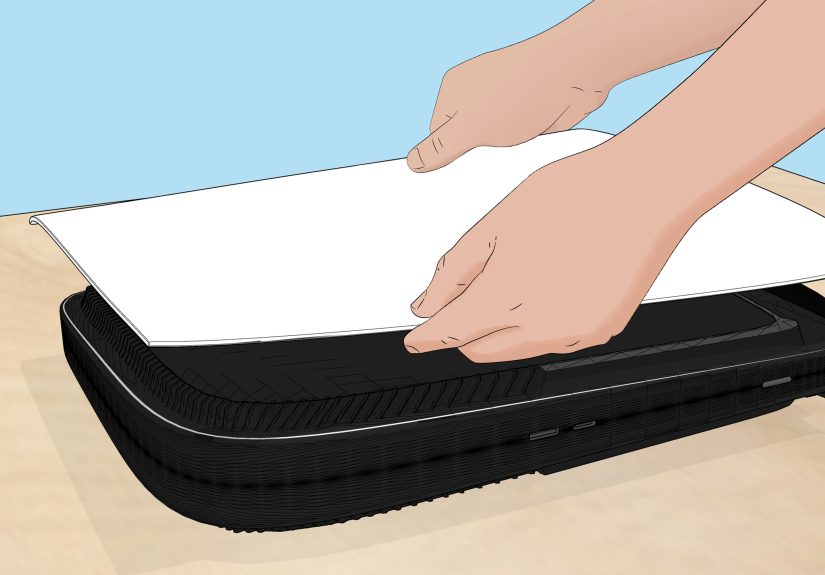
Step 2: Remove the PS5 covers (plates)
- Hold the console securely with one hand.
- With the other hand, lift slightly at the corner and slide the cover off with gentle pressure.
- If it doesn’t move, pause and repositiondon’t force it like you’re opening a stubborn pickle jar.
Quick reality check: The covers can take a little finesse. “Firm but controlled” is the vibe.
Step 3: Vacuum the dust catchers (the “designed for cleaning” moment)
Inside, you’ll find areas intended to collect dust so it can be removed more easily. This is where a
narrow vacuum attachment shines.
- Use a crevice tool or narrow nozzle.
- Vacuum each dust-catching opening for a few seconds.
- Do not scrape plastic edgeshover and let suction do the work.
Step 4 (optional): Clean visible dust near the fan areacarefully
If you can see dust clumps or pet hair near the fan intake area, you can gently remove it without fully
disassembling the console.
- Tweezers can grab hair clumps (gently).
- A soft brush can loosen dust, then the vacuum can lift it.
If you use compressed air, do it the safe way
Compressed air can help dislodge stubborn dust, but it can also push debris deeper if used aggressively. If you
choose to use it:
- Use short bursts, not a continuous blast.
- Keep the can upright (no tilting upside down).
- Don’t spray from point-blank range.
- Prevent the fan from spinning freely if you’re blowing air near it (a light touch to steady the blades is enough).
Step 5: Reassemble and test
- Slide the covers back on until they click into place.
- Reattach the stand (if you use it).
- Plug everything back in.
- Power on and listenmany people notice the fan sounds smoother after a good dust removal.
How often should you clean your PS5?
There’s no one perfect schedule, because dust depends on your environment. Use this as a practical baseline:
- Every 1–2 weeks: quick exterior wipe + light vent brushing
- Every 1–3 months: Method 2 (covers off + vacuum dust catchers), especially with pets or carpet
- Seasonally: a deeper check if you live somewhere with heavy pollen, construction, or wildfire smoke
If your PS5 sits near a kitchen (grease particles are real) or in a room with candles/incense, you may need more
frequent cleaning because dust can get a little… sticky.
Signs your PS5 is overdue for a clean
- The fan is noticeably louder than it used to be.
- You feel stronger/hotter airflow than usual (or airflow seems weaker).
- You see visible dust around side/back vents.
- Games start running hot after shorter sessions.
- You get overheating warnings or unexpected shutdowns (stop playing and address airflow/cleaning).
Placement tips that prevent dust buildup (clean less, play more)
- Leave space around the console so vents can breathe.
- Avoid putting the PS5 on thick carpet or shag rugs.
- Don’t cram it into a tight cabinet where heat and dust collect.
- Don’t cover it with cloth “to protect it from dust” while it’s in usethis blocks ventilation.
- Consider elevating it slightly off the floor where dust settles fastest.
FAQ: Quick answers to common PS5 cleaning questions
Can I wipe my PS5 with rubbing alcohol?
For the console’s exterior, the safest approach is a soft, dry cloth. If you need extra help for
smudges, use a cloth that’s slightly damp with water, then dry immediately. Avoid getting any
moisture into vents, seams, or ports. If you’re thinking about alcohol because it works great on other gadgets,
remember that console plastics and finishes can be pickyand “stronger” isn’t always “better.”
Is a vacuum really safe for a PS5?
A low-powered handheld vacuum is ideal because it removes dust instead of relocating it deeper
into the console. Use gentle passes, avoid bumping components, and stick to vent areas and the dust-catcher
openings (Method 2).
Should I open the PS5 completely to clean the fan?
Most people don’t need a full teardown. Start with Method 1. If noise or dust persists, Method 2 often solves it.
Full internal cleaning and part removal is best reserved for advanced users or repair situations.
Will cleaning fix overheating?
Cleaning can help if overheating is caused by restricted airflow from dust buildup. But overheating can also come
from poor placement (tight spaces), blocked vents, high ambient heat, or long gaming sessions in a warm room.
Clean first, then improve airflow and spacing.
Wrap-up: Keep it cool, keep it quiet
If you remember nothing else, remember this: airflow is the whole game. A PS5 with clear vents and
less dust inside usually runs cooler and sounds calmer. Start with the quick clean, level up to the cover-off
vacuum when needed, and your console will be far less likely to audition for a role as a leaf blower.
Real-World Experiences : What people notice after cleaning a PS5
One of the most common “aha” moments PS5 owners describe is how sneaky dust buildup can be. From the outside,
the console might look finemaybe a little dull, maybe a few fingerprintsbut nothing dramatic. Then someone
finally runs a soft brush along the vents and realizes the “light dust” is actually a dense layer that’s been
quietly collecting for months. The funniest part? A lot of people say the dust they remove doesn’t even look like
dust anymore. It looks like a felt strip, a gray cotton candy sheet, or (in homes with pets) a tumbleweed made of
fur that appears to have formed its own opinions about rent.
Another frequent experience: “My PS5 got loud out of nowhere.” Owners often assume a new game is the culprit
(bigger graphics, harder work, louder fan). Sometimes that’s truenewer titles can push the system morebut many
people report the noise improves after a proper vent and dust-catcher cleaning. What’s happening is pretty
simple: dust reduces airflow, the console compensates by ramping fan speed, and suddenly your quiet setup sounds
like it’s preparing for takeoff. After Method 2, people often describe the fan as “smoother” or “less whiny,” and
the console as feeling less hot during long sessions.
Homes with pets bring their own special storyline. A common scenario goes like this: the PS5 sits near the TV
stand, the cat claims the couch, and everything is peacefuluntil the console starts running warm and the owner
notices fuzz around the vents. Pet hair is lightweight, and it loves airflow. That means it can collect near
intakes faster than regular dust. People in this situation often say they switched from “I’ll clean it when I
remember” to a simple routine: a quick microfiber wipe weekly, light vent brushing every couple of weeks, and a
cover-off vacuum every couple of months. The best part? It’s usually easier than expected, and it keeps the PS5
from becoming a fur-powered space heater.
Some experiences are more dramaticlike after a home renovation, moving apartments, or even just rearranging a
room. Construction dust and drywall particles are incredibly fine, and they can settle everywhere. People who set
up their PS5 during a move (boxes, dusty floors, constant foot traffic) sometimes report that their console starts
sounding louder within weeks. In these cases, Method 2 is often the turning point, because it removes the dust
that got pulled under the covers and trapped in the console’s dust-catching areas. The lesson many people share:
if your environment changes (renovation, new pets, different flooring), your cleaning schedule should change too.
Then there’s the “sticky dust” situation. This usually happens when the PS5 is near a kitchen, burning candles
often, or in a space with smoke residue. Owners describe dust that doesn’t lift easily with a quick vacuum pass
because it clings. In those cases, people often have success using a soft brush to loosen dust first, then vacuum
to remove itrather than trying to blast it away. The big takeaway in these stories is that gentle, repeated
cleaning works better than one aggressive session. Most people say once they do a proper cleaning once, the next
time is much easier because dust never gets the chance to build up into a thick layer.
Finally, a surprisingly common “experience” is peace of mind. After cleaning, many owners say they stop worrying
about overheating, especially during long gaming sessions. They feel more confident that airflow is clear, vents
aren’t blocked, and the console isn’t slowly cooking itself. And honestly, that’s the best outcome: your PS5 runs
cooler, sounds quieter, and you get to spend your time gaming instead of listening to your console impersonate a
household appliance.