Table of Contents >> Show >> Hide
- What Happened to Flash: The Short (Slightly Dramatic) Timeline
- Can You Still Install Flash Player in 2026?
- The Safer Way to Run Old Flash Content: Modern Alternatives
- How to Replace Flash Today (Without Rebuilding the Entire Internet)
- Common Myths (And the Reality Check)
- A Practical Decision Guide: What Should You Do?
- Real-World Experiences: What People Typically Run Into (And How It Feels)
- Conclusion
Once upon a time, the internet ran on three things: pop-up ads, dial-up noises, and Adobe Flash Player.
Flash powered everything from browser games and animated intros to those “click here to skip” videos that never let you skip.
Then the party endedand for very good reasons.
If you’re here because you found an old training module, a childhood game, a dusty SWF file on an external drive, or a work portal that still thinks it’s 2009:
you’re not alone. The big question is the same for everyone:
Can you still install Flash Player today?
Let’s cut through the nostalgia, the sketchy download buttons, and the “just enable it in settings” myths.
Here are the facts, what still works (sometimes), and the safest alternatives in 2026.
What Happened to Flash: The Short (Slightly Dramatic) Timeline
Flash reached end-of-lifeand then got the “please uninstall me” memo
Adobe ended support for Flash Player at the end of 2020, which means:
no more security updates, no more bug fixes, no more official support.
Not “we’ll patch it occasionally,” but “this is over.”
After that, Flash didn’t just become “old.” It became dangerousbecause software that stops receiving security updates
tends to become a welcome mat for exploits. Flash had a long history of security problems even when it was actively maintained,
which is part of why the web moved on.
Browsers didn’t just hide Flashthey removed the machinery
Even before the end-of-life date, major browsers were phasing Flash out, asking permission to run it, blocking it by default,
and steadily removing the plugin pathways it relied on.
Eventually, modern browser versions stopped supporting Flash entirely.
Translation: it’s not just “disabled.” In most mainstream browsers, the ability to run the Flash plugin is gone.
You can’t flip a switch for something that isn’t installed in the house anymore.
Windows updates helped remove built-in Flash
On Windows, Microsoft also pushed updates designed to remove Adobe Flash Player components that were bundled into the OS.
So even if you never touched Flash yourself, parts of it may have been swept out during normal updates.
Can You Still Install Flash Player in 2026?
In practical terms, for normal web browsing: no. Not in the way people mean when they ask this.
You can’t install a current, supported Flash Player plugin for modern Chrome, Edge, Firefox, or Safaribecause it no longer exists as a supported product,
and the browsers no longer support it.
The “official installer” situation
Adobe stopped distributing and updating Flash Player after end-of-life. If you find “Flash Player installers” floating around the internet,
they’re almost always old copies hosted by third parties.
That’s like taking candy from a stranger… except the candy is an unpatched browser plugin with a history of vulnerabilities.
If you absolutely must interact with legacy Flash content, the question shouldn’t be “Where can I download Flash Player?”
It should be: “What’s the safest way to access this content without turning my device into a museum exhibit called ‘Malware Through the Ages’?”
“But I only need it for one old site” (the most expensive sentence in IT)
This is the trap: one old site becomes one old portal, then one old plugin, then one “temporary” workaround that lasts four years.
If it’s a personal use case (like an old game), you have safer options than installing Flash.
If it’s a business use case (like an old admin dashboard), you’ll want a planned migration or a controlled legacy access strategy.
What might still exist (but usually isn’t worth it)
-
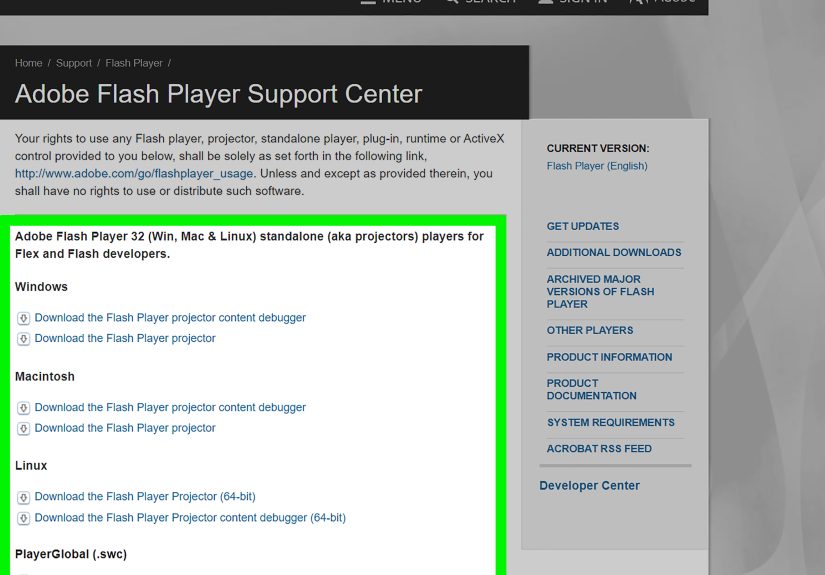
Old standalone players (historically called “projectors”) that ran SWF files without a browser.
These are still risky if outdated, and may not behave reliably with modern systems. -
Legacy environments where Flash was never removed (often because the system was never updated).
This is a security red flag, not a recommended path. -
Enterprise exceptions that some organizations attempted during the transition eratypically with strict allowlists.
These are not a long-term plan and are widely discouraged due to risk.
Bottom line: If your goal is “play SWF content,” you do not need the original Flash Player anymore.
You need a modern alternative.
The Safer Way to Run Old Flash Content: Modern Alternatives
1) Ruffle: A Flash emulator built for modern browsers
Ruffle is one of the most popular solutions because it’s designed to bring Flash content back
without installing the original Flash Player plugin. It runs as an emulator (often via WebAssembly),
which helps avoid the exact security nightmare Flash became known for.
What it’s good for:
- Playing many classic Flash animations and games directly in a modern browser
- Opening SWF files in a safer, modern runtime
- Helping site owners keep old Flash pages usable for visitors
What to expect:
- Compatibility varies. Some complex ActionScript 3 projects may not run perfectly yet.
- Performance can depend on the content and your device.
- It’s improving over time, but it’s not a magic wand for every SWF ever created.
2) Flashpoint: Preservation for games and interactive web content
If your main goal is “I want to play old browser games and interactive classics,”
Flashpoint is a well-known preservation project that packages a huge library of web games and animations
(not just Flash, but other old web tech too) for offline access.
Why people like it:
- Designed for preservation and offline play
- Often provides a smoother experience than fighting with legacy browsers
- Massive catalog of historical content
Important note: preservation projects can raise copyright and licensing questions depending on the content.
If you’re a creator or rights holder, look for opt-out or takedown options offered by the project.
3) Site-specific modern players (the “Newgrounds solution” approach)
Some long-running platforms migrated by integrating modern playback options (including emulation approaches).
If you’re trying to access content on a major archive site, check whether the site already supports a modern player.
This is the lowest-effort path: let the platform do the heavy lifting.
4) If you own the content: convert it instead of clinging to it
If you’re the site owneror you have the original project filesconverting is usually the best long-term move.
Flash-era content often falls into a few buckets:
ads/animations, videos, simple interactive experiences, and full games/apps.
Each bucket has a different “best modern home.”
How to Replace Flash Today (Without Rebuilding the Entire Internet)
Convert Flash animations to HTML5 (when you have source files)
Many creators used Adobe Flash Professional back in the day, and later transitioned to Adobe Animate.
For certain projectsespecially timeline animations and simpler interactive piecesHTML5 Canvas export can be a reasonable path.
Realistic expectations:
- Simple animations and banners often convert fairly well.
- Heavier ActionScript projects typically require rewriting logic in JavaScript.
- Font rendering, filters, and complex interactivity may need manual cleanup.
Replace Flash video players with modern HTML5 video
A huge amount of “Flash content” was actually just video wrapped in a Flash player.
In those cases, the fix can be straightforward: use a modern HTML5 video player and host the media in common formats.
Practical example:
An old college department site might have a 2011 “Flash video gallery.”
Often, the best move is to extract the video files (if you have them), re-encode if necessary, and publish with a modern player.
Users get better accessibility, mobile compatibility, and fewer headaches.
Rebuild interactivity with modern web tech
Modern equivalents to common Flash features include:
- Canvas and SVG for graphics and animation
- WebAudio for sound and timing
- WebGL (or libraries built on it) for 2D/3D rendering
- WebAssembly for performance-heavy workloads
If your Flash project was a full game, you’ll often get better results by porting to a modern engine or framework
rather than trying to “convert” it. It’s more work up front, but far less fragile long-term.
What about Adobe AIR apps?
AIR is a separate runtime used for desktop applications that historically shared Flash-era technology.
Some legacy AIR apps still exist in the wild, and the AIR ecosystem has continued under new stewardship.
This matters mainly if you’re maintaining an old internal tool or a legacy desktop appnot for general web browsing.
Common Myths (And the Reality Check)
Myth: “I can just re-enable Flash in Chrome settings.”
Reality: That was sometimes possible during the transition years.
Modern Chrome versions do not support Flash playback, and enterprise policies that once controlled Flash behavior are no longer a path forward.
Myth: “If I find an old installer, it’ll work like before.”
Reality: Even if it runs, you’re dealing with outdated software that isn’t receiving security updates,
and modern browsers won’t cooperate the way they used to.
“It launches” is not the same as “it’s safe” or “it’s supported.”
Myth: “It’s fine if I only use Flash offline.”
Reality: Offline use can reduce exposure, but it doesn’t magically make outdated software safe.
If you’re handling unknown SWF files from the internet, treat them like any other untrusted file format.
Safer emulation tools exist for a reason.
A Practical Decision Guide: What Should You Do?
If you just want to play old games or watch animations
- Try a trusted emulator approach first (for example, modern Flash emulation in a browser).
- Use preservation-focused solutions for large libraries of classic web games.
- Avoid random “Flash Player download” sites. Seriously. Close the tab. Back away slowly.
If your school/work portal still requires Flash
- Push for modernization: HTML5 replacements, vendor updates, or a re-platform plan.
- If legacy access is unavoidable, keep it controlled and temporary, with clear ownership and timelines.
- Document the dependency so it doesn’t become a permanent mystery nobody wants to touch.
If you own the Flash content (or have the original project files)
- Convert what can be converted (animations, simple interactions).
- Rebuild what must be rebuilt (complex apps and games).
- For video-only use cases, migrate to HTML5 video and improve accessibility.
Real-World Experiences: What People Typically Run Into (And How It Feels)
The end of Flash didn’t arrive like a meteor. It arrived like a slowly closing curtainuntil one day,
someone clicked a link and got… nothing. Here are common experiences people report when they try to revive Flash-era content today,
plus what usually works best.
1) The “I swear this worked last year” moment.
Someone finds an old e-learning modulemaybe workplace compliance training or a school lessonand it loads to a blank box.
The panic isn’t dramatic; it’s practical: “We need this for onboarding,” or “This is required for certification.”
The biggest surprise is learning that the issue isn’t your internet connection or a missing checkbox
it’s the complete absence of Flash support in modern browsers. Once people accept that it’s not “broken settings,”
they stop hunting for magic toggles and start planning replacements.
2) The “helpful” search result that leads to a sketchy download.
This is the classic trap: you search “install Flash Player,” the internet throws confetti, and a random site offers a big shiny download button.
People click it because it looks like the solutionuntil antivirus warnings pop up, the installer demands weird permissions,
or the computer starts acting like it drank six energy drinks. The lesson lands fast:
the easiest path is often the riskiest. Most people pivot to safer emulation tools after this scare.
3) The “my childhood is trapped in a SWF file” situation.
You find a folder named “old games” or “cool animations,” and inside are SWF files you haven’t opened in a decade.
The emotional arc is real: excitement, confusion, frustration, and then relief when a modern emulator plays it again.
People are often surprised by how good some Flash animations still feelsnappy, expressive, charming in a “handmade internet” way.
The win here is realizing you can revisit the content without resurrecting the original plugin.
4) The business dashboard that time forgot.
IT teams sometimes discover Flash dependencies in the least glamorous places: printer admin panels, old network appliance interfaces,
internal reporting tools, or vendor portals nobody wants to rewrite. The “experience” isn’t nostalgiait’s negotiation.
Teams end up mapping who owns the tool, whether a vendor has an upgrade path, and what the real deadline is.
The best outcomes usually involve a plan and a timeline, not a permanent workaround.
5) The creator’s dilemma: convert or rebuild?
Designers and developers who still have project files often describe conversion as a mix of hope and humility.
Simple timeline animations can migrate reasonably well to modern formats, but complex interactive projects rarely survive a one-click export.
People end up rewriting logic, replacing old libraries, and rebuilding pieces they assumed would “just work.”
It’s frustratingbut also freeing, because the result runs on phones, tablets, and modern browsers without begging users to install anything.
6) The “preservation” rabbit hole.
Plenty of people start with one game and end up exploring huge archives of early web culture.
They’re amazed by how much history lived in Flashmini games, interactive art, experimental storytelling.
The experience becomes less about “install Flash Player” and more about “how do we keep digital culture accessible?”
That’s where preservation tools shine: they don’t just restore functionality, they restore a slice of the internet’s past.
Conclusion
Can you still install Flash Player? Not in any normal, supported, modern-browser wayand trying to force it is usually unsafe and frustrating.
The smarter move in 2026 is to treat Flash like a retired piece of tech: respect its history, but don’t run your life on it.
If you need to access old Flash content, choose modern solutions that are built for today:
emulation for playback, preservation projects for classic games, and conversion to HTML5 or modern frameworks for content you own.
You’ll get fewer headaches, better security, and an internet experience that doesn’t require a time machine.