Table of Contents >> Show >> Hide
- First: What People Mean When They Say “Soldered RAM”
- So… Can You Upgrade Soldered RAM? YesIn Three Scenarios
- The BGA RAM Upgrade: What Actually Has to Go Right
- “Is It Worth It?” A Practical Cost-Risk Reality Check
- How to Tell Which Kind of “Soldered” You’re Dealing With
- Buying Advice: How to Future-Proof Without Guessing Wrong
- Conclusion
- Real-World Experiences: When “Non-Upgradable” RAM Wasn’t the End (≈)
“The RAM is soldered.” Four words that hit like a pop-up asking you to accept cookies… from 2007… on a dial-up connection. The internet treats soldered laptop memory like a permanent tattoo: once it’s there, it’s there forever. And for most people, most of the time, that’s basically true.
But “basically” is doing a lot of work in that sentence. Because soldered doesn’t always mean impossibleit can mean “not user-serviceable,” “upgradeable only with the right design,” or “upgradeable if you’re willing to pay someone with a microscope and nerves of steel.”
Let’s unpack the myth, the reality, and the few real-world scenarios where you actually can upgrade “non-upgradable” RAMwithout turning your laptop into an expensive coaster.
First: What People Mean When They Say “Soldered RAM”
1) LPDDR memory: fast, efficient… and usually soldered
Many thin-and-light laptops use LPDDR (low-power DDR) memory for battery life and compact layouts. The tradeoff is that LPDDR is commonly implemented in ways that aren’t meant for removable SO-DIMMs. That’s why you see so many modern ultraportables where the memory is permanently attached to the motherboard.
Translation: manufacturers aren’t always soldering memory just to ruin your weekend. Sometimes it’s about space, power, and signal integrity. But the upgrade pain is still real.
2) “Soldered” can also mean “half soldered” (the hybrid setup)
Here’s the sneaky part: some laptops ship with one chunk of RAM soldered plus one open slot. Sellers may still advertise “soldered memory” because… well… part of it is. But you can often add a module and increase total RAM significantly.
If you’ve ever heard someone say, “My laptop has soldered RAM but I upgraded it anyway,” this hybrid design is usually the reason.
3) Unified memory (SoC/on-package): a different beast
Some systems integrate memory extremely tightly with the processor package (often marketed as “unified memory”). In these designs, upgrading RAM is less like swapping parts and more like “rebuilding the heart of the machine.” For consumers, the practical option is typically: buy the capacity you need upfront or replace the entire logic board.
So… Can You Upgrade Soldered RAM? YesIn Three Scenarios
Scenario A: Your laptop has soldered RAM and an empty slot
This is the “good news disguised as bad news” category. If your laptop has 8GB or 16GB soldered and a free SO-DIMM slot, you can often add another stick and boost performanceespecially if you’re currently paging to disk.
What you gain depends on the CPU’s memory controller and how the system handles dual-channel operation with mismatched sizes. Some laptops run “flex mode” (part dual-channel, part single-channel). The result is still usually a big win for multitasking, browser tab hoarding, and creative workloads.
- Best for: everyday speedups, productivity, light content creation, gaming laptops with one soldered stick.
- Reality check: you can’t remove the soldered portionso choose base RAM wisely when buying.
Scenario B: The laptop uses a modern “compressed-attached” memory module (CAMM2 / LPCAMM2)
Here’s the plot twist that makes the headline true without requiring a soldering iron: new standards like CAMM2 (and the low-power variant LPCAMM2) are designed to deliver high-speed memory in a replaceable, upgradeable module.
Instead of a tall SO-DIMM slot, a CAMM-style module mounts flat and is held down with screws/pressure. It can pack LPDDR-class performance while remaining serviceable. In plain English: the memory chips are soldered to the module, not permanently to your motherboard.
This matters because it brings back a future where thin laptops don’t automatically mean “no upgrades.” Some workstation-class systems already use these modules, and repair guides exist that treat memory replacement like a normal part swap.
- Best for: buyers who want thin-and-light performance without locking RAM forever.
- Reality check: you need a laptop built for itCAMM/LPCAMM2 isn’t a universal retrofit.
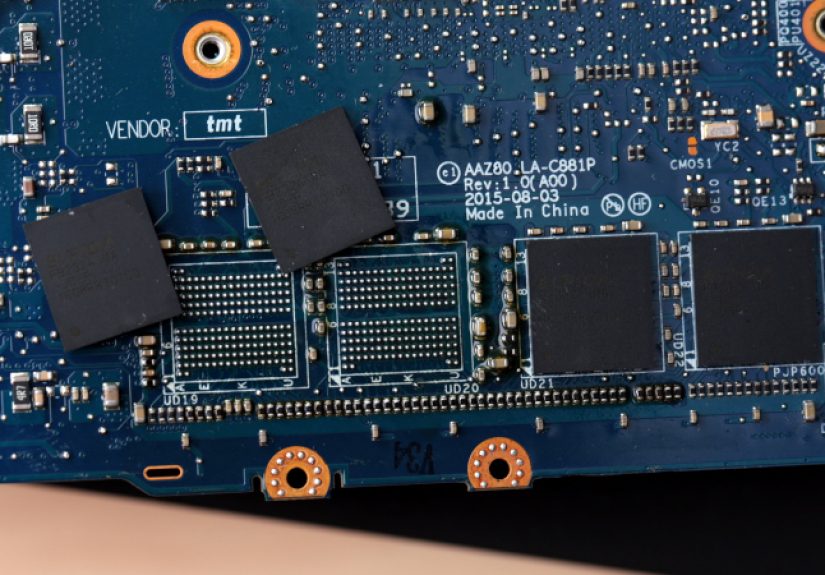
Scenario C: A technician performs a board-level BGA memory upgrade (the “surgical” option)
Yes, it’s possible to remove BGA memory packages and replace them with higher-density chips. It’s also possible to juggle chainsaws. The question is: should you?
Board-level RAM upgrades are real. They happen in advanced repair shops, modding scenes, and specialty services. But they require equipment, skill, and compatibility knowledge that goes far beyond DIY. And even then, success depends on whether the platform firmware and memory controller will accept the new configuration.
The BGA RAM Upgrade: What Actually Has to Go Right
If you’re curious (or you enjoy reading about high-stakes electronics surgery), here’s what a successful soldered RAM upgrade typically involves. Not a “how-to,” more like a “why this costs money and stress.”
Step 1: Identify the exact memory chips and layout
You can’t just slap on “more RAM.” The board is routed for a certain number of chips, widths (x16/x32), ranks, and signaling constraints. Technicians often match memory IC families, package types, and sometimes even source donor chips from identical boards.
Step 2: Remove the original chips without damaging the board
BGA work typically uses controlled preheating and hot air (or specialized rework stations). Too much heat, the board warps or pads lift. Too little, the chip won’t release cleanly and you tear traces. Either way, the laptop becomes an abstract art piece titled “Warranty Void.”
Step 3: Reball, align, and solder the replacement chips
Replacement chips often need “reballing” (restoring the solder balls on the chip underside). Alignment is microscopic. The tolerances are unforgiving. A tiny bridge or cold joint can cause no-boot issues that are difficult to diagnose.
Step 4: Make the system recognize the new RAM
This is where myths go to dieand projects go to fail. Many platforms need configuration changes so the firmware trains memory correctly. That can mean strap resistor changes, firmware edits, or BIOS reprogramming. Some successful upgrades reported publicly include both hardware swaps and BIOS-level changes before the device would boot reliably.
In other words: the soldering is only half the story. The platform support is the real boss fight.
“Is It Worth It?” A Practical Cost-Risk Reality Check
| Upgrade Path | Difficulty | Risk | Who It’s For |
|---|---|---|---|
| Add RAM to an open SO-DIMM slot | Low | Low | Most users (if your laptop has a slot) |
| Upgrade via CAMM2/LPCAMM2 module | Medium | Low–Medium | Owners of compatible laptops |
| Replace motherboard/logic board with higher-RAM variant | Medium | Medium | When parts pricing makes sense |
| BGA chip swap (board-level rework) | Very High | High | Specialty repair/moddinglast resort |
How to Tell Which Kind of “Soldered” You’re Dealing With
1) Check the manufacturer’s service manual or specs
The most reliable answer usually lives in official documentation: memory type (LPDDR vs DDR), number of slots, and maximum supported capacity. If it says LPDDR soldered to the system board, that’s a strong hint you’re not doing a normal upgrade.
2) Look for “slots: 0” vs “slots: 2” indicators (but don’t trust them blindly)
Operating systems can report memory “slots,” but they don’t always tell the full truth on hybrid designs. Treat software tools as clues, not verdicts.
3) Open the bottom coveronly if you’re comfortable
If the laptop is out of warranty (or you accept the risk), a visual inspection can confirm whether a SO-DIMM slot exists. If you see a standard RAM slot, congratulations: your upgrade story just became boringin the best way.
Buying Advice: How to Future-Proof Without Guessing Wrong
- If the laptop uses LPDDR and has no slots: buy more RAM upfront than you think you need. Browsers aren’t getting calmer.
- If it’s hybrid (soldered + slot): aim for a higher soldered base if possible, then add a module later.
- If upgradeability matters long-term: consider models with SO-DIMM, CAMM/LPCAMM2, or a known repair-friendly ecosystem.
- If you’re considering BGA rework: compare the cost to selling the laptop and buying the right config. Your wallet hates drama.
Conclusion
Soldered RAM usually means “not upgradeable at home.” But “not upgradeable at home” is not the same as “never upgradeable.” Some laptops hide an extra slot. Newer designs like CAMM2/LPCAMM2 are actively trying to bring upgradeable high-speed memory back. And yesboard-level BGA upgrades can work in skilled hands, though they’re rarely the smartest first option.
The real takeaway is simple: don’t stop at the phrase “soldered RAM.” Figure out which kind you have, then pick the upgrade path that matches realityrather than internet despair.
Real-World Experiences: When “Non-Upgradable” RAM Wasn’t the End (≈)
In repair circles and enthusiast communities, soldered RAM is one of those topics that reliably triggers three reactions: (1) resignation, (2) rage, and (3) someone casually posting a photo of a motherboard under a microscope like it’s a normal Tuesday. The gap between “consumer upgrade” and “component-level upgrade” is enormousyet the stories are surprisingly consistent.
The most common “think again” moment doesn’t involve solder at allit’s the hybrid laptop discovery. Someone buys a slim notebook assuming they’re stuck with 8GB forever, then learns there’s actually one open slot. Suddenly, the upgrade is as dramatic as removing a bottom cover and popping in a memory module. The performance change is often immediate: fewer app reloads, fewer browser tab crashes, smoother video calls while a dozen documents stay open. The funny part is how often the owner feels tricked twicefirst by the fear of soldered RAM, then by the realization that the machine was upgradeable the whole time.
The second category is the “design evolution” win: CAMM-style memory. People who lived through the great ultrabook era of sealed parts tend to be skepticalbecause history has earned that skepticism. But the early experiences with LPCAMM2-style systems read like a small miracle: high-speed low-power memory, mounted flat, removed with screws, replaced without rework stations, and treated like an actual part instead of a permanent life choice. Owners describe it as the first time in years they could buy a thin performance laptop and still feel like they had an escape hatch.
Then there’s the high-wire act: BGA upgrades. The lived experience here is less “upgrade journey” and more “engineering incident report.” The successful ones usually start with obsessive planning: matching IC part numbers, verifying package compatibility, confirming the platform has other configurations that shipped with higher RAM, and preparing for the possibility that the laptop won’t recognize the new chips without additional changes. Even when the soldering is perfect, the system may fail memory training, boot-loop, or crash under load until the configuration is corrected.
Cost is the other recurring theme. People imagine soldered RAM upgrades as a simple “swap,” but the real expense is time, tooling, risk, and accountability. If a shop quotes hundreds of dollars, they’re not charging for the chipsthey’re charging for the expertise required to avoid lifting pads, warping boards, and returning a laptop that boots reliably. And when it works, the satisfaction is real: resurrecting a perfectly good machine that was artificially capped by a memory decision made at purchase. But the most honest post-upgrade reflection is usually: “I’m glad this exists… and I’m glad I didn’t try it myself.”
Put all those experiences together and you get the mature truth: soldered RAM is a spectrum, not a sentence. Sometimes it’s a mild inconvenience. Sometimes it’s a hard stop. And sometimesif the hardware design or the repair skill is thereit’s an obstacle you can actually go around.