Table of Contents >> Show >> Hide
- Why iOS 26 Feels Bigger Than a Typical iPhone Update
- 1. Liquid Glass Gives the iPhone Its Biggest Visual Shake-Up in Years
- 2. Live Translation Makes Your iPhone Way Better at Human Communication
- 3. Call Screening and Hold Assist Finally Declare War on Phone Nonsense
- 4. Visual Intelligence Turns Your Screen Into Something Searchable
- 5. Messages Gets More Fun, More Useful, and Slightly Less Chaotic
- What iOS 26 Gets Right Beyond These Five Features
- Who Should Be Most Excited About iOS 26?
- Real-World Experiences: What These iOS 26 Features Actually Feel Like Day to Day
- Final Verdict
Apple has a habit of releasing iPhone updates that sound modest on paper and then quietly rearrange your digital life. iOS 26 is not one of those shy updates. This one barges in wearing a shiny new outfit, carrying an armful of AI tricks, and acting like your phone suddenly got better social skills.
It is also the kind of update that makes people say, “Wait, iOS 26? Did Apple skip a bunch of numbers?” Yes, sort of. Apple shifted its naming so the software lines up with the year-based branding across its platforms. But the bigger story is not the number. It is the fact that iOS 26 feels like one of the biggest iPhone updates in years, mixing a major design overhaul with genuinely useful features that solve everyday annoyances.
And that is the key word here: useful. Plenty of software updates promise a sci-fi future and deliver three new wallpapers plus a button nobody asked for. iOS 26 actually brings standout changes you can imagine using on day one. Whether you care about cleaner visuals, smarter calls, better group chats, or real-time translation, there is a lot to like here.
So, instead of wandering through every tiny tweak buried in Settings, let’s focus on the main event. These are the five coolest new features in iOS 26, why they matter, and why this update feels bigger than the usual annual iPhone refresh.
Why iOS 26 Feels Bigger Than a Typical iPhone Update
Most iOS releases have one star attraction and a supporting cast of “nice, I guess” improvements. iOS 26 is different because it attacks the iPhone experience from multiple directions at once. It changes how the phone looks, how it handles calls, how it translates conversations, how it understands what is on your screen, and how it makes texting less chaotic.
That combination matters. A design refresh can make your phone feel new, but practical features make it feel smarter. iOS 26 does both. It is flashy enough to notice immediately and functional enough to stick around after the novelty wears off. That is a rare combo in modern software, where “innovative” often means “good luck finding it in a submenu.”
1. Liquid Glass Gives the iPhone Its Biggest Visual Shake-Up in Years
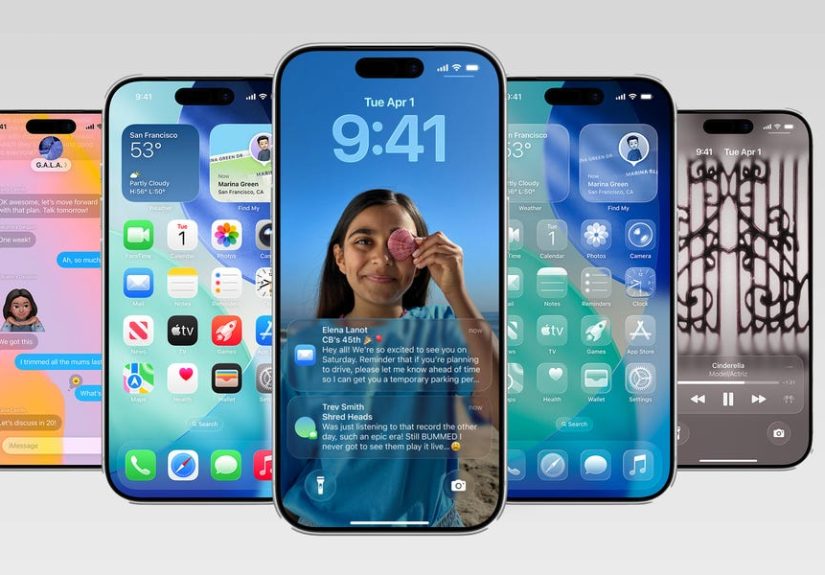
The most obvious change in iOS 26 is the new Liquid Glass design language. Apple has reworked the look of buttons, navigation bars, controls, widgets, app icons, and system surfaces so they appear more translucent, layered, and dynamic. The result is a more fluid, reflective interface that feels a little futuristic without turning your iPhone into a spaceship dashboard.
On the Lock Screen, the clock can adapt more naturally around your wallpaper, notifications feel more integrated, and the whole experience looks more alive. Across the system, menus and controls have a glass-like quality that gives apps a lighter feel. It is the kind of redesign that makes older versions of iOS suddenly look like they are wearing cargo shorts in a room full of tailored suits.
Why it matters
Design changes are easy to dismiss as cosmetic, but the best ones subtly improve how a device feels every time you use it. Liquid Glass gives iOS 26 a cleaner sense of depth and motion, which makes everyday interactions feel less flat. You notice it when opening apps, pulling up menus, glancing at notifications, or moving through Control Center.
More importantly, it finally makes iOS feel new again. Apple has refined the iPhone interface for years, but iOS 26 is one of the few updates that genuinely changes the mood of the device. Even if you are not obsessed with UI design, you will probably notice that your phone simply feels fresher.
2. Live Translation Makes Your iPhone Way Better at Human Communication
If Liquid Glass is the flashy extrovert of iOS 26, Live Translation is the quiet genius. Apple is bringing real-time translation deeper into the iPhone experience, including Messages, FaceTime, and Phone. That means your iPhone can help translate text conversations and even assist during live communication in a way that feels much more integrated than copying and pasting into a translation app like it is still 2016.
This is one of those features that sounds niche until you think about how many real-world situations it touches. Maybe you are messaging relatives overseas. Maybe you are coordinating travel plans with a host in another country. Maybe you are on a call and your brain decides to forget high school Spanish at the worst possible moment. Live Translation is built for those friction points.
Why it matters
The coolest thing about this feature is not that translation exists. Translation tools have been around forever. It is that Apple is weaving translation directly into the communication apps people already use all day. That lowers the mental effort. There is less app-hopping, less fumbling, less “hold on while I translate this” energy.
It also makes the iPhone feel more globally useful. For travelers, multilingual families, international students, remote workers, and anyone who communicates across languages, Live Translation could be one of the most meaningful iOS features Apple has introduced in years. It is practical, immediate, and the kind of tool that earns its place by saving awkward moments.
3. Call Screening and Hold Assist Finally Declare War on Phone Nonsense
Phone calls are weird now. Half the time you do not know whether an incoming number is your dentist, a delivery driver, or a scammer trying to sell you a fake timeshare in a place you have never heard of. iOS 26 addresses that mess with two smart features: Call Screening and Hold Assist.
Call Screening gathers information from unknown callers before you decide whether to answer. That means your phone can help you avoid interruptions without forcing you to play detective every time a random number appears. Hold Assist, meanwhile, helps when you are stuck waiting for a live agent. Instead of listening to hold music that sounds like a keyboard demo from 1998, your iPhone can notify you when an actual human becomes available.
Why it matters
This is not flashy in the same way as a new design, but it may be more valuable in daily life. Unwanted calls are one of the most annoying parts of modern smartphone ownership. A feature that reduces interruptions, filters nonsense, and gives users more control is instantly useful.
Hold Assist is especially clever because it targets a universal pain point. Nobody enjoys staying chained to a phone speaker while waiting for customer service. Letting your iPhone babysit the line is exactly the kind of quality-of-life improvement that makes people say, “Okay, that is actually smart.”
In other words, iOS 26 is not just trying to make your phone prettier. It is trying to make it less irritating. That deserves applause.
4. Visual Intelligence Turns Your Screen Into Something Searchable
One of the most intriguing features in iOS 26 is the expanded Visual Intelligence experience. Apple is pushing this beyond the camera and into what you are actively viewing on your iPhone screen. In plain English, that means your phone gets better at understanding content you are looking at and helping you do something with it.
See a lamp in a screenshot and want to find something similar? Your iPhone can help search for it. Looking at an event and want to add it to your calendar? iOS 26 can recognize relevant details. Need more context on what is in front of you on the display? The system is designed to make that interaction feel faster and more natural.
Why it matters
This is where the iPhone starts feeling less like a collection of apps and more like an assistant layered over your digital life. Visual Intelligence brings context to the screen itself. Instead of asking, “Which app do I need for this?” the phone starts helping you act on what you already have in front of you.
That is a big shift. It reduces friction in small but important ways. Shopping inspiration, event planning, image lookup, information gathering, and on-screen discovery all get smoother. It is also one of the clearest examples of Apple trying to make AI feel practical rather than theatrical. No robot hype, no dramatic speeches, just less tedious work for you.
5. Messages Gets More Fun, More Useful, and Slightly Less Chaotic
Apple is finally giving Messages more personality in iOS 26. Group chats can now use polls, backgrounds are more customizable, and message screening for unknown senders gives users more control over who gets attention. Translation support also ties into Messages, which helps make it a more capable communication hub overall.
The polls feature is especially welcome because group chats are often where simple decisions go to die. Picking a restaurant, choosing a meeting time, deciding whose car is being sacrificed for the road trip, and settling that eternal debate about whether brunch is a meal or a lifestyle can all get resolved faster with an actual voting tool.
Backgrounds add more style and identity to conversations, which is a small change but a fun one. And message screening for unknown senders is a practical counterbalance to the playful stuff, giving users a dedicated place to manage unexpected texts without letting every spammy message storm the main inbox like it owns the place.
Why it matters
Messages is one of the most-used apps on iPhone, so even small improvements have outsized impact. iOS 26 upgrades it in a way that feels both social and sensible. The app becomes more expressive when you want it to be and more controlled when you need it to be.
That balance is important. Apple is not just adding flashy group-chat toys. It is also making messaging more manageable. For most people, that is the sweet spot.
What iOS 26 Gets Right Beyond These Five Features
Even outside the headline additions, iOS 26 has the kind of supporting improvements that make the whole update feel deeper. The Phone app has a more unified layout. CarPlay gets more helpful at-a-glance information. Apple continues pushing intelligence features into more parts of the system. And smaller refinements across apps make the iPhone feel more polished.
That matters because the best software updates are not just built around one viral feature. They create momentum across the system. iOS 26 feels like Apple trying to make the iPhone more modern in both appearance and behavior, not just patching on a few extras for the keynote demo.
Who Should Be Most Excited About iOS 26?
If you love visual refreshes and get bored with the same interface after a year, Liquid Glass alone will grab your attention. If you care more about utility, Call Screening, Hold Assist, Live Translation, and Visual Intelligence are the real stars. And if your life is basically one long chain of group texts, Messages may end up being the sleeper favorite.
The only important caveat is that not every iOS 26 feature lands equally on every supported iPhone. Some Apple Intelligence-powered tools need compatible hardware, so the full experience is best on newer models. Still, even without every single AI perk, iOS 26 appears to offer enough core improvements to make it a meaningful update for a lot of users.
Real-World Experiences: What These iOS 26 Features Actually Feel Like Day to Day
Here is the best way to think about iOS 26: it is less about one dramatic magic trick and more about your phone becoming smoother, smarter, and less annoying in a hundred tiny moments. That is why the experience of using these features matters as much as the feature list itself.
Take Liquid Glass. On paper, it sounds like design jargon dreamed up in a very expensive conference room. In practice, it changes the atmosphere of the iPhone. The device feels lighter, more layered, and more responsive. Opening apps, checking notifications, and moving through menus all feel a bit more polished. It is the sort of change you stop consciously noticing after a while, but you absolutely feel it when you go back to an older version of iOS.
Live Translation is even more obvious in daily life. Imagine texting a family member who prefers another language, checking in with a local contact while traveling, or trying to keep a FaceTime call moving without awkward pauses. Instead of stopping the conversation to translate something manually, the iPhone helps keep the interaction flowing. That matters because the best tech disappears into the background. Nobody wants to feel like they are operating a translation lab just to ask what time dinner starts.
Call Screening and Hold Assist may end up being the features people brag about most once the novelty of the new design wears off. The first time your phone helps sort out whether an incoming call matters, you will wonder why this took so long. The first time you avoid sitting on hold for fifteen minutes listening to looped jazz while waiting for customer support, you may want to send your iPhone a thank-you note.
Visual Intelligence has a different kind of appeal. It feels modern in a sneaky way. Say you spot a jacket in a screenshot, a lamp in a social post, or an event flyer with details buried in the image. Instead of manually extracting information or hunting around the web with vague search terms, the phone helps bridge that gap. It turns the screen into something more interactive and actionable. That shift sounds small until you realize how often we all save images, screenshots, and posts with the intention of “dealing with it later.” iOS 26 helps you deal with it now.
Then there is Messages, which finally seems to understand that group chats are both beloved and deeply chaotic. Polls can settle basic decisions in seconds. Backgrounds make conversations feel more personal. Screening unknown senders keeps random junk from barging into your main thread lineup. The app becomes more fun without becoming messier, which is honestly impressive. Social features have a way of becoming cringe when overdone, but these seem aimed at making communication smoother rather than louder.
Put all that together, and the iOS 26 experience feels surprisingly balanced. It has enough visual drama to feel new, enough intelligence to feel modern, and enough practical value to feel worth installing. That is a strong combination. The coolest part of iOS 26 is not just that Apple added five flashy features. It is that those features seem built to make your phone more pleasant to live with every single day.
Final Verdict
iOS 26 looks like one of Apple’s most complete iPhone updates in a long time. Liquid Glass gives the platform a fresh identity, Live Translation makes communication easier, Call Screening and Hold Assist tackle everyday annoyances, Visual Intelligence makes your screen more actionable, and Messages becomes both more useful and more fun.
That is a pretty great top five. More importantly, these are not gimmicks. They target real habits: calling, texting, searching, sharing, translating, and surviving group chats with your sanity intact. If Apple delivers these features smoothly, iOS 26 could be remembered as the update that made the iPhone feel noticeably smarter without making it feel complicated.
And in smartphone software, that is the dream: less friction, more usefulness, and just enough flair to make you show your friend one cool thing before pretending you are not impressed.