Table of Contents >> Show >> Hide
- What Is PentaPico?
- Why Image Convolution Is a Great Test Case
- The Hardware: Five Tiny Boards, One Big Lesson
- How the PentaPico Cluster Processes an Image
- The Performance Twist: More Nodes, Slower Results
- Why I2C Is Both Clever and Limiting
- Image Boundaries: Where Bugs Love to Party
- What PentaPico Teaches About Parallel Computing
- How PentaPico Compares With Traditional Image Processing
- Possible Improvements and Future Experiments
- Hands-On Experience: What Building a PentaPico-Style Cluster Feels Like
- Conclusion
Somewhere between a serious computer engineering project and the kind of delightful hardware mischief that makes a workbench look like it survived a tiny robot thunderstorm, PentaPico asks a charming question: what happens if you turn five Raspberry Pi Pico boards into a miniature cluster computer and make them process image convolution tasks together?
The answer is educational, slightly chaotic, and much more interesting than a simple benchmark chart. PentaPico is not trying to dethrone a desktop GPU, replace OpenCV, or scare NVIDIA into hiding under a server rack. Instead, it demonstrates the guts of parallel computing using small, inexpensive microcontrollers. It turns abstract ideas like task distribution, communication overhead, memory limits, and synchronization into blinking LEDs, wires, serial output, and the occasional “why is this image broken?” debugging session.
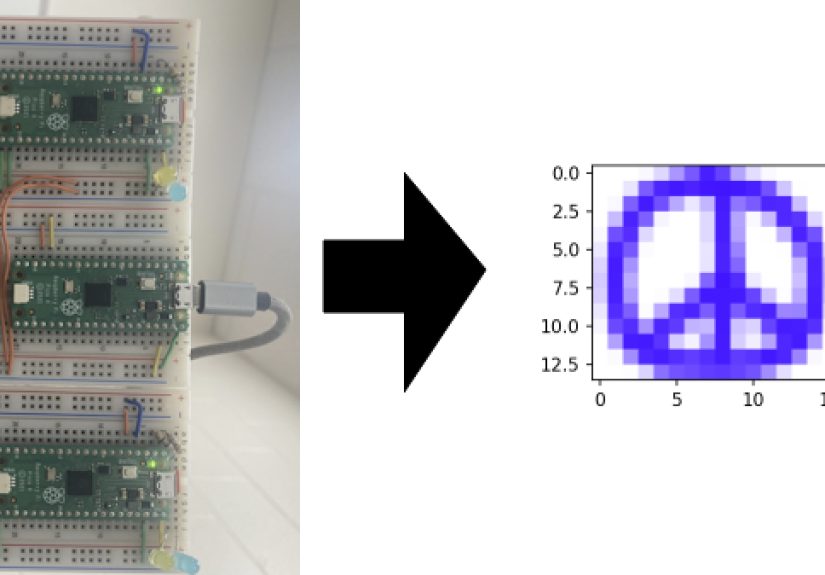
Built around Raspberry Pi Pico microcontrollers, PentaPico uses one Pico as a head node and four others as compute nodes. The cluster receives an image, divides the work, sends pieces to the compute boards, applies image convolution, and collects the results. It is a hands-on lesson in the hard truth of distributed computing: sometimes the math is not the slow part. Sometimes the slow part is getting everyone to talk without tripping over the furniture.
What Is PentaPico?
PentaPico is a five-node Raspberry Pi Pico cluster designed for image convolution tasks. The name is wonderfully literal: “Penta” for five, “Pico” for the five Raspberry Pi Pico boards doing the work. It was created as an academic cluster computing project, but it has the soul of a classic maker build: humble parts, ambitious goals, and a healthy amount of debugging adventure.
The architecture is simple in concept. One Raspberry Pi Pico acts as the controller, or head node. That head node communicates with a computer over USB, receives commands and image data, and then coordinates the compute nodes. The other four Pico boards act as workers. They receive assigned portions of the image, perform convolution calculations, and return results to the head node.
In practice, of course, “simple” is doing some heavy lifting. Distributed systems have a talent for making easy ideas complicated. A single processor running a convolution loop does not have to ask another processor if it is ready, wait for data transfer, track row boundaries, handle partial image regions, or stitch separate results back together. A cluster does. That is exactly why PentaPico is such a good learning project: it exposes the real engineering costs hidden behind the phrase “just parallelize it.”
Why Image Convolution Is a Great Test Case
Image convolution is a classic image-processing operation. It uses a small matrix, usually called a kernel or filter, to transform each pixel based on nearby pixels. If you have ever sharpened a photo, blurred a background, detected edges, embossed an image, or used a computer vision filter, you have met convolution, even if it was wearing sunglasses and pretending to be “enhance image” magic.
A typical convolution kernel might be a 3×3 matrix. The algorithm slides that matrix over the image, multiplies nearby pixel values by the kernel values, sums the result, and writes a new pixel. A blur kernel smooths details. A sharpening kernel exaggerates contrast. An edge detection kernel highlights abrupt changes. This makes convolution both practical and easy to visualize. You can see the result immediately, which is helpful when debugging because a broken output image tends to shout at you in black stripes, shifted rows, or other pixel-based insults.
Convolution is also a natural fit for parallel processing. Many output pixels can be computed independently once their local neighborhood is available. That makes the workload “embarrassingly parallel,” a phrase computer scientists use when a task is so easy to split up that even the task looks a little embarrassed. Divide the image into horizontal bands, send each band to a worker, process the bands, and combine the results. In theory, more workers should mean faster results.
But PentaPico demonstrates why theory and breadboards occasionally need couples counseling.
The Hardware: Five Tiny Boards, One Big Lesson
The Raspberry Pi Pico is based on the RP2040 microcontroller, a compact chip with a dual-core Arm Cortex-M0+ processor, a flexible clock up to 133 MHz, 264 KB of SRAM, USB 1.1 support, and a generous set of I/O options including I2C, SPI, UART, PWM, ADC, and programmable I/O. That is a lot of capability for a board that can disappear under a sticky note.
In PentaPico, these strengths matter. The Pico is inexpensive, approachable, and low-power. It supports C development, communicates over USB, and can talk to other boards through I2C. For a classroom or home lab, that combination is excellent. You do not need a rack, a switch, a cooling plan, or a conversation with the power company. You need a handful of boards, wires, code, patience, and ideally a desk where jumper wires do not migrate into your coffee.
The cluster layout is intentionally modest. The head node connects to a workstation through USB. A Python script on the workstation controls the process and sends image data. The head node then distributes work to the compute nodes over I2C. The compute-node firmware and head-node firmware are written in C, which keeps the project close to the hardware and makes memory management very real. There are no luxurious piles of RAM here. Every buffer matters.
How the PentaPico Cluster Processes an Image
The basic workflow begins on the workstation. A user runs a Python-side client that sends an input image and convolution kernel to the head Pico. The head node then divides the image into sections, assigns work to one or more compute nodes, and sends each compute node the data it needs.
Each compute Pico receives information about the image dimensions and kernel dimensions, accepts a block of pixel data, performs the convolution calculation, and stores or returns the processed result. The head node gathers the completed output sections and sends the final image back to the host computer for display or analysis.
The communication protocol is one of the most interesting parts of the build. Image convolution itself is not mysterious: loops, indices, pixels, kernel values, and output buffers. The tricky part is coordinating several tiny boards. The compute nodes need to know when they are receiving dimensions, when image data is coming, when they should work, and when their results are ready to be collected. The head node needs to know when a worker is idle, busy, finished, or confused in that special way only embedded systems can be confused.
This is where PentaPico becomes more than a novelty. It shows that parallel computing is not only about adding processors. It is about scheduling, messaging, memory layout, boundary handling, result assembly, and timing. Those are the same categories of problems that appear in larger distributed systems, only here they are small enough to understand without needing a data center badge.
The Performance Twist: More Nodes, Slower Results
The most memorable result from PentaPico is also the funniest: adding more compute nodes did not make the system faster. In fact, the total runtime became slower as more nodes were added. That sounds like failure if you are only reading the headline. It is not. It is the lesson.
The reason is communication overhead. The image convolution workload on these small images and kernels is not heavy enough to justify the time spent distributing data and collecting results over the chosen communication path. The compute work is relatively quick. The data transfer and coordination dominate the runtime. In other words, the workers are not lazy; they are standing around waiting for the mail.
This is one of the central realities of cluster computing. Parallelism has a price. Splitting a job into pieces, sending those pieces elsewhere, waiting for remote processors, and merging the results can cost more than simply doing the job locally. A faster cluster is not created by adding processors at random. It requires the right workload size, the right interconnect, efficient protocols, balanced partitions, and enough computation per byte transferred.
PentaPico makes that tradeoff visible. A desktop computer can hide communication details behind high-speed memory buses, caches, and optimized libraries. A GPU can process convolution with massive parallelism and huge memory bandwidth. A five-Pico I2C cluster cannot hide much of anything. That honesty is useful. It teaches why serious high-performance computing engineers talk so much about bandwidth, latency, synchronization, and data locality.
Why I2C Is Both Clever and Limiting
I2C is a practical choice for connecting microcontrollers. It is widely supported, requires few wires, and is easy to reason about compared with more elaborate networking setups. For a project like PentaPico, I2C lets the head node communicate with multiple compute nodes without adding much hardware complexity.
The tradeoff is speed. I2C was not designed to be a high-throughput image transport system. It is excellent for sensors, configuration registers, small packets, and polite conversations between chips. Asking it to move image chunks around a cluster is like using a garden hose to fill a swimming pool. It can be done, but do not act surprised when lunchtime arrives.
This limitation is what makes the project educational. A faster communication method might improve performance, but it would also hide the lesson. With I2C, the overhead is obvious. You can see why the cluster slows down. You can reason about the bottleneck. You can ask better design questions: Should the image chunks be larger? Should the kernel be sent once and cached? Should rows overlap to handle border pixels? Should the protocol avoid unnecessary acknowledgments? Should SPI, UART, USB, or PIO-based custom links be considered?
Image Boundaries: Where Bugs Love to Party
Splitting an image for convolution is not as easy as cutting a sandwich. Each output pixel depends on neighboring input pixels. If a worker receives only its assigned rows, it may still need extra rows above or below its region so the convolution kernel can operate correctly near boundaries. These extra rows are often called halo rows or overlap regions.
Without careful handling, the final image can show seams between processed sections. Rows can shift. Bottom edges can be wrong. Output buffers can be copied into the wrong place. If the code reads past the end of an array, the project may produce modern art instead of image processing. Sometimes that art is funny. Sometimes it is a reminder that C does not believe in guardrails unless you build them yourself.
PentaPico’s development process included exactly these kinds of issues: incorrect dimensions, row indexing trouble, output assembly problems, and memory safety headaches. That is not a mark against the project. That is embedded development being embedded development. The impressive part is that the cluster became functional, produced convolution output, and generated timing data useful for understanding the system.
What PentaPico Teaches About Parallel Computing
The first lesson is that parallel computing is not magic. Adding processors does not automatically create speedup. A task must have enough independent computation to overcome communication costs. Image convolution can be highly parallel, but only when the data movement is efficient relative to the calculation.
The second lesson is that architecture matters. A Raspberry Pi Pico cluster is very different from a Raspberry Pi 4 cluster, which is very different from a GPU, which is very different from a cloud cluster. They may all use words like nodes, workers, tasks, and parallelism, but the performance story depends on memory, interconnects, software layers, and workload design.
The third lesson is that measurement beats assumptions. It would be easy to assume that four compute nodes must be faster than one. PentaPico measured the opposite under its conditions. That result is valuable because it turns a vague concept into evidence. Communication overhead was not a footnote; it was the main character.
The fourth lesson is that small hardware can teach big ideas. You do not need a supercomputer to understand load balancing, bottlenecks, protocol design, or synchronization. A few microcontrollers can teach those ideas with refreshing clarity. They may also teach humility, usually at 1:00 a.m., while you stare at an output image and wonder why the bottom rows have joined a rebellion.
How PentaPico Compares With Traditional Image Processing
In normal software development, most people would process image convolution with a mature library like OpenCV. OpenCV offers functions for custom filtering, Gaussian blur, median blur, sharpening, and other operations. On a modern computer, these routines are optimized, reliable, and far faster than a breadboard cluster of microcontrollers.
On the high-performance side, GPUs are built for massively parallel operations like convolution. A GPU can run thousands of threads and move large amounts of image data through high-bandwidth memory. Techniques like separable convolution can further reduce work for certain kernels by splitting a two-dimensional filter into horizontal and vertical passes. That is the highway version of the problem.
PentaPico is the scenic route. It is slower, bumpier, and far more educational. Instead of hiding complexity behind a function call, it exposes every stage of the process. That makes it useful for students, hobbyists, and engineers who want to understand what really happens when a problem moves from one processor to many.
Possible Improvements and Future Experiments
The most obvious improvement would be communication. Replacing or supplementing I2C with a faster link could make the cluster more competitive. SPI might offer better throughput. USB-based communication could be explored. The RP2040’s programmable I/O could be used for custom protocols, although that path leads into deeper firmware territory where dragons may request timing diagrams.
Another improvement would be workload size. Larger images or more computationally expensive kernels could shift the balance toward useful parallelism. If each worker spends much longer computing relative to transfer time, the cluster has a better chance of showing speedup.
The software could also be optimized. The head node could reduce repeated data transfers, cache kernels, pipeline communication and computation, or improve scheduling so workers spend less time waiting. More careful handling of halo regions could reduce unnecessary copying. Better instrumentation could separate USB transfer time, I2C transfer time, memory allocation, compute time, and result assembly time.
Finally, the project could become a teaching platform. Students could implement different kernels, compare one-node and four-node runs, plot speedup, calculate parallel efficiency, and experiment with protocol changes. That would turn PentaPico from a single build into a miniature lab for distributed systems.
Hands-On Experience: What Building a PentaPico-Style Cluster Feels Like
Working on a project like PentaPico feels different from writing a normal image-processing script. In Python with OpenCV, you load an image, define a kernel, call a function, and enjoy the result. If something goes wrong, the error is usually polite enough to appear in your terminal. On a microcontroller cluster, the error may appear as a frozen serial connection, a compute node that never reports idle, a result image with strange black bands, or an LED that blinks in a way that feels judgmental.
The first experience is wiring discipline. Five Pico boards on a breadboard setup can quickly become a colorful nest of jumper wires. Power, ground, I2C data, I2C clock, address-selection pins, status LEDs, and USB connections all need to behave. A single loose wire can impersonate a software bug for hours. Good labeling, short wires, common ground checks, and incremental testing are not optional. They are survival tools.
The second experience is protocol design. You quickly learn that “send the image” is not a protocol. The receiving board needs to know what kind of message is arriving, how many bytes to expect, what state it should enter, and when it is safe to process the data. A clean state machine becomes your best friend. Commands such as “receive dimensions,” “receive image and kernel,” “start computation,” and “return result” make the system understandable. Without that structure, every node becomes a tiny philosopher asking, “What is data, really?”
The third experience is memory awareness. On a desktop, allocating image buffers is casual. On a Pico, memory is a budget meeting. Image dimensions, kernel size, intermediate buffers, result buffers, and communication buffers all compete for SRAM. You start thinking carefully about data types. Do you need 32-bit integers everywhere? Can pixel values use bytes? Is the kernel fixed size? Can the result be streamed instead of fully stored? These questions make the project feel refreshingly concrete.
The fourth experience is debugging by evidence. Timing data matters. LED states matter. Serial logs matter. Test images matter. A simple peace-sign image or small grayscale pattern can reveal indexing problems faster than a complex photograph. Colored debug outputs that show which node processed which rows can be incredibly helpful. When the output looks wrong, you need to know whether the convolution math failed, the image chunk was wrong, the boundary rows were missing, or the final assembly copied data into the wrong place.
The fifth experience is learning to respect overhead. Before building a cluster, it is tempting to think parallelism means dividing work and winning speed. After building one, you understand that data transfer is work too. Waiting is work. Coordination is work. Reassembly is work. The best distributed systems are designed to minimize those costs, not merely to multiply processors.
That is why PentaPico is such a satisfying project. It is not impressive because it beats a laptop. It is impressive because it makes invisible computing concepts visible. You can point to the head node and say, “That one schedules work.” You can point to the compute nodes and say, “Those process image chunks.” You can point to the wires and say, “That is the bottleneck.” And then, because the universe has a sense of humor, you can point to a weird output image and say, “That is probably an off-by-one error.”
Conclusion
PentaPico is a tiny cluster with a big personality. It combines Raspberry Pi Pico boards, C firmware, USB control, I2C communication, Python scripting, and image convolution into a project that teaches more than its benchmark numbers suggest. Its slower-with-more-nodes result is not a failure; it is the point. The project shows that parallel computing depends on the relationship between computation and communication, and that relationship can be brutally honest on microcontrollers.
For makers, PentaPico is a fun build to study. For students, it is a practical lesson in distributed computing. For engineers, it is a reminder that performance is rarely where optimism says it should be. And for anyone who enjoys seeing small boards attempt big ideas, it is proof that a cluster does not need to be huge to be fascinating. Sometimes five Picos, a few wires, and an image filter are enough to teach the whole room something useful.
Note: This article is written for web publication in original language and is based on verified public technical information about the PentaPico project, Raspberry Pi Pico hardware, image convolution, and parallel-computing principles.