Table of Contents >> Show >> Hide
- What “Firefox Homepage” Really Means (Desktop vs. Mobile)
- The Big Shift: From “Start Page” to “Resume Page”
- Desktop: The New Tab Page Is Getting More “Useful First”
- Session Restore: The Classic “Pick Up Where You Left Off” Power Move
- Firefox View: A Purpose-Built “Return to Your Tabs” Command Center
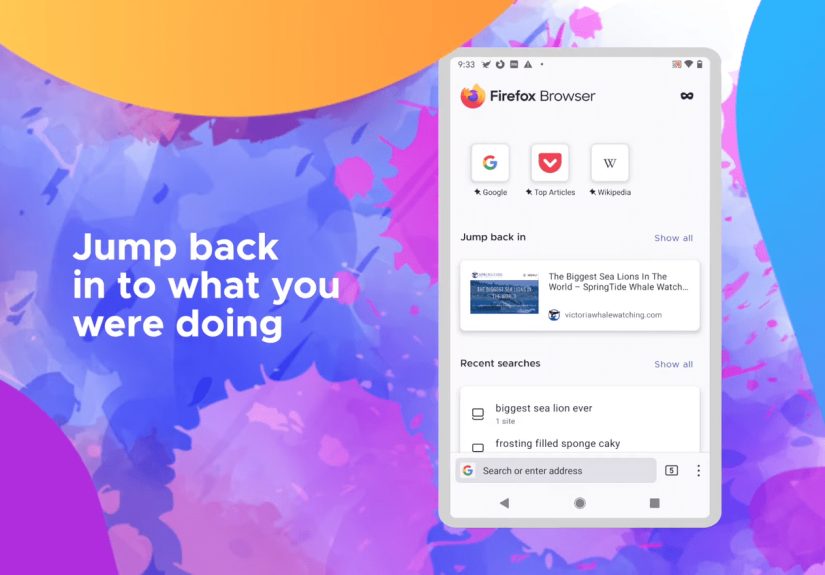
- Mobile: “Jump Back In” as a First-Class Feature
- Customization: A Homepage That Matches Your Brain
- A Note on Recommended Stories: The Post-Pocket Reality
- Privacy and “Picking Up Where You Left Off” Aren’t Enemies
- Practical Examples: How People Actually Use This “Resume” Homepage
- Troubleshooting: When “Resume” Doesn’t Resume
- Why This Matters: A Homepage That Respects Your Attention
- Real-World Experiences: What It’s Like Living With a “Resume-First” Firefox Homepage
The modern web isn’t a single “browse” so much as a never-ending relay race. You start reading an article, hop to a recipe,
get distracted by a work doc, then panic-close everything when your boss walks by (or when your laptop fan starts sounding
like it’s preparing for takeoff). A homepage that simply says “Hello, here’s a blank boxgood luck!” doesn’t cut it anymore.
Firefox’s recent homepage and new-tab directionacross desktop and mobileleans into a surprisingly humane idea:
your browser should help you resume your life online, not restart it from scratch every time you open a window.
“Picking up where you left off” shows up in multiple places: session restore, recent activity, synced tabs, and tools like
Firefox View that treat your last browsing session like a bookmark you didn’t have to remember to create.
What “Firefox Homepage” Really Means (Desktop vs. Mobile)
Firefox uses “Home” and “New Tab” a little differently depending on platform, but the goal is the same: create a re-entry
point for what you were doing. On desktop, the “homepage” often means the Firefox Home / New Tab pagewhere you can see
shortcuts, recently visited items (depending on settings), and other modules you choose to show. On mobile, the homepage
is more of a task hub: recent tabs, recent searches, saved items, and “jump back in” style prompts.
In both places, the philosophy is clear: the homepage should behave like a friendly doorman who says,
“Welcome backyour stuff is right this way,” instead of a bouncer who demands you explain your intentions in a search box.
The Big Shift: From “Start Page” to “Resume Page”
Browsers used to treat every launch as a fresh start. That was fine when “the web” was five sites and a dream. Now it’s
research trails, shopping comparisons, multi-step workflows, and a dozen tabs that are “important” in the same way your
laundry pile is “temporary.”
Firefox’s homepage features increasingly support three real-world behaviors:
- Continuing an interrupted task (reading, filling forms, comparing products, drafting).
- Switching devices without losing context (desktop ↔ phone ↔ laptop).
- Recovering gracefully from chaos (crashes, restarts, updates, accidental window closures).
Desktop: The New Tab Page Is Getting More “Useful First”
On desktop, Firefox’s New Tab / Firefox Home experience has been evolving toward a layout that prioritizes the stuff you
actually click when you’re trying to continue: search, shortcuts, and “what’s next” suggestionsespecially on larger screens.
This isn’t just cosmetic; layout changes can quietly influence whether your homepage helps you resume work or distracts you
into wandering off to read about ancient Roman plumbing at 2 a.m.
A Layout That Treats Your Screen Like Real Estate
Recent desktop updates introduced a refreshed New Tab layout in regions where certain modules are available, with a stronger
emphasis on search and shortcuts near the top and a layout that can display more columns on larger monitors. In practice,
that means less scrolling and more “I can see what I need right now.”
Shortcuts, Recent Activity, and the “Just Let Me Get Back to It” Feeling
The Firefox Home page can include shortcuts to frequently visited sites and (depending on your settings) recent activity.
The point isn’t to show off that you visit the same three websites every day (no judgment), but to reduce friction:
one click to reopen the tool, doc, or page you were already using.
If you like a minimal start page, Firefox doesn’t force you into the “busy dashboard” lifestyle. The homepage is modular,
and you can typically toggle sections on or off so your New Tab page can be either a helpful concierge or an empty white room
where you confront your own choices.
Session Restore: The Classic “Pick Up Where You Left Off” Power Move
Sometimes the most productive homepage is… your last session. Firefox has long supported restoring previous windows and tabs
so you can reopen the browser and continue without rebuilding your mental map. This is especially handy if you:
- Work in “tab clusters” (research over here, work over there, fun over in the shame corner).
- Get interrupted mid-task and need everything exactly as it was.
- Live in fear of updates, crashes, or accidental “Close Window” clicks.
The smartest part: session restore turns “my browser closed” from a disaster into a mild inconvenience. It’s not flashy,
but neither is a seatbeltand yet you still want one.
Firefox View: A Purpose-Built “Return to Your Tabs” Command Center
If session restore is the big red “rewind” button, Firefox View is the organized assistant who hands you a neat folder labeled
“Stuff You Were Doing.” It’s designed to help you get back to content you previously discovered by bringing together:
recently closed tabs, open tabs, and tabs from other devices via tab pickupplus related history and navigation helpers,
depending on your setup.
Tab Pickup and Cross-Device Continuity
One of the most practical “pick up where you left off” features is being able to grab tabs from another device.
Start reading something on your phone, then continue on desktop without playing “send yourself a link” gymnastics.
Firefox Sync supports this continuity by sharing open tabs (and other data, if you choose) across devices signed into the
same account.
The homepage angle here is subtle but important: once your browser becomes a cross-device workspace, the homepage isn’t just
a launchpadit’s a handoff point. That handoff is what makes your browsing feel continuous instead of fragmented.
Mobile: “Jump Back In” as a First-Class Feature
On mobile, Firefox has been even more explicit about the “resume” approach. Instead of treating the homepage as a blank start
line, mobile Firefox has emphasized quick access to recent taskslike recent tabs, recent searches, and other activity cues
so you can return to something unfinished without digging through history.
This matters because mobile browsing is inherently interruption-prone. You’re reading, then the elevator arrives. You’re
researching, then your coffee shows up. You’re trying to quietly compare hotel prices, then someone asks,
“Are you working?” (You weren’t… until now.)
Why This Feels So Good on a Phone
Small screens punish extra steps. If “continue reading” takes five taps, your brain will simply choose a different activity
often one that ends with you watching a video titled “I trained my goldfish to play chess.” A resume-friendly homepage is a
productivity feature disguised as convenience.
Customization: A Homepage That Matches Your Brain
Not everyone wants the same kind of “pick up where you left off.” Some people want a strong memory. Others want plausible
deniability. Firefox’s approach generally allows you to customize the home experience, including turning off sections you
don’t want and prioritizing the ones you do.
Here are three customization “personalities” that tend to work well:
1) The Focused Minimalist
You want a clean homepage with just search and a few shortcuts. You rely on session restore or Firefox View when you need to
resume. Your homepage is a calm desk, not a bulletin board.
2) The Task Resumer
You want recent activity, recently closed tabs, and device handoff. Your homepage is a “continue where you left off” center.
You optimize for speed and context recovery.
3) The Curated Explorer
You like recommendations and discovery moduleswhen they’re relevant. Your homepage helps you resume and find the next
good read. (But ideally without turning into a distraction machine.)
A Note on Recommended Stories: The Post-Pocket Reality
For years, Firefox’s New Tab page included content recommendations tied to Pocket. But Pocket has shut down, and Mozilla has
removed Pocket integration in later desktop versions (and certain ESR versions). If you remember seeing Pocket-powered
recommendations before and then noticed changes, you’re not imagining it. Firefox’s homepage experience has had to evolve
around that shift.
The bigger lesson: homepage modules come and go, but the “resume your work” concept remains durable. Shortcuts, recent tabs,
session restore, and synced handoff don’t depend on a single content serviceand those are the features that keep your day
moving when you’re bouncing between tasks.
Privacy and “Picking Up Where You Left Off” Aren’t Enemies
It’s fair to ask: doesn’t a resume-focused homepage mean the browser is “remembering” a lot? It canif you choose.
But Firefox’s approach generally allows you to decide how much is displayed on the homepage and how history behaves.
A practical balance looks like this:
- Show what you need (recent tabs/shortcuts) but avoid oversharing on the start page.
- Use Sync intentionally if you want cross-device continuity.
- Rely on session restore for productivity without turning the homepage into a diary.
Practical Examples: How People Actually Use This “Resume” Homepage
Example A: The Research Rabbit Hole (Without Losing the Thread)
You’re comparing small business banking options. You open ten tabs: fees, reviews, sign-up bonuses, fine print. Then you get
interrupted. Later, a resume-friendly homepage approach helps in two ways: session restore brings back your workspace, and
Firefox View / recently closed tabs help recover anything you accidentally shut.
Example B: Phone-to-Desktop Handoff for “Real Work”
You read a technical article on your phone during downtime. When you get back to your computer, synced tabs and tab pickup
mean you don’t have to search again, scroll again, and find your place again. You just continue. It feels smalluntil you
realize it saves minutes every day.
Example C: The “Oops, Everything Closed” Moment
Everyone has done it: you close the wrong window, or the browser restarts, or an update decides now is the time.
Restore Previous Session turns that moment from “I have to rebuild my brain” into “Okay, we’re back.”
Troubleshooting: When “Resume” Doesn’t Resume
If your homepage isn’t showing what you expector your recent activity is blankthere are a few common culprits:
- Homepage content toggles might be turned off (shortcuts, recent activity, etc.).
- History settings may limit what can appear if the browser isn’t set to remember history.
- Privacy tools and extensions can reduce what’s stored or displayed (sometimes intentionally).
- Sync isn’t enabled (or you’re signed out), so cross-device tabs can’t appear.
The upside: most of these are preferences, not “broken.” Firefox tends to give you knobs to turnsometimes so many knobs that
you briefly wonder if you’re operating a submarine.
Why This Matters: A Homepage That Respects Your Attention
A good homepage should do two things: reduce friction and reduce distraction. Firefox’s “pick up where you left off” direction
is useful because it saves you from repeating steps you already completedfinding the page again, remembering what you were
doing, reconstructing the context.
When it works well, the homepage becomes an extension of your memorynot in a creepy way, but in a “thank goodness I don’t have
to redo that” way. And in a world where your attention is constantly being auctioned off to the highest bidder, a homepage
that helps you stay on track is quietly radical.
Real-World Experiences: What It’s Like Living With a “Resume-First” Firefox Homepage
If you’ve ever opened your browser and felt the brief panic of “Wait, what was I doing?”, a resume-first homepage feels like
a small superpower. The experience isn’t dramatic like a new theme or a flashy animation. It’s more like walking into a room
and finding your keys exactly where you left them. You don’t celebrate. You just feel calmer.
One common experience is the “two-minute continuity win.” You start an article on your phone while waiting in line, then later
you sit down at your computer and want to finish it. Without tab pickup or synced tabs, you’d search again, open a different
result, scroll, and try to guess where you stopped. With Firefox’s continuity tools, your brain stays in the same place:
you reopen the exact page and continue reading. It’s a tiny difference that adds upespecially if you do it multiple times a day.
Another real-world moment is the “accidental cleanup” disaster. Maybe you close the browser to restart your computer.
Maybe an update happens. Maybe you close the wrong window because your trackpad interpreted your gesture as “delete my life.”
When restore options are set up, the recovery feels almost unfairly easy: the browser returns with your previous windows and
tabs, and your workflow reappears like a stage crew resetting a scene. People who live in multi-tab work sessions tend to
describe this as the difference between “I lost an hour” and “I lost ten seconds.”
The homepage itself becomes more personal over time. If you keep shortcuts enabled, you start to notice patterns: the same few
sites you always return to when you’re “getting serious,” the same project tools you open first, the same doc portal that
somehow always needs another login. A resume-friendly homepage isn’t just about the pastit gently nudges you toward your next
action. You open a new tab and your brain goes, “Oh right, that’s the thing I meant to finish.”
There’s also a surprisingly practical emotional benefit: less “restarting fatigue.” On busy days, you’re already context-switching
between messages, tasks, people, and responsibilities. If your browser also makes you rebuild your context every time, it adds
invisible stress. A homepage that surfaces recent tabs, session continuity, or quick re-entry points removes that stress.
It doesn’t make work fun (that would be suspicious), but it makes work feel less scattered.
And yes, there’s a customization journey. Many people try a “dashboard” homepage, then dial it back. Maybe you keep shortcuts
and remove everything else. Maybe you turn off modules that feel noisy and keep only what helps you resume. The best experience
tends to happen when the homepage reflects your real habits: it should make returning easier without turning into a cluttered
bulletin board that competes for attention.
In the end, the most honest review is this: a resume-first Firefox homepage doesn’t try to entertain you. It tries to
return you to yourselfto what you were doing and why you opened the browser in the first place. And in 2025, that’s
a refreshingly practical kind of innovation.