Table of Contents >> Show >> Hide
- What you’ll learn
- MK4S vs CORE One: a quick, practical comparison
- What you gain by upgrading: the benefits that actually matter
- 1) Enclosure + active chamber control: the “advanced materials stop being a hobby” upgrade
- 2) More usable build volume, especially in height
- 3) CoreXY motion: speed gains that are less about “bragging rights” and more about “less babysitting”
- 4) A more space-efficient “enclosed solution” than boxing in an i3
- 5) Workflow upgrades: production-minded design details
- What you give up: the tradeoffs people gloss over
- Cost math: conversion kit vs buying a CORE One vs doing nothing
- So… who should upgrade? The scenarios where it makes real sense
- Pre-upgrade checklist: what to confirm before you click “Add to cart”
- The 5-minute decision framework
- Conclusion
- Experiences related to upgrading MK4S to CORE One (what it feels like in real life)
You’ve got a Prusa MK4S. It’s reliable, it’s fast, it’s basically the golden retriever of 3D printers: eager, friendly, and rarely dramatic.
Then Prusa drops the CORE One (and now CORE One+)an enclosed CoreXY machine with active chamber temperature controland suddenly your MK4S is looking at you like,
“Am I… still enough?”
Let’s answer the real question: Does upgrading an MK4S to a CORE One (via conversion kit) actually make sense, or is it just a very expensive way to
experience the joy of disassembling something that already works?
MK4S vs CORE One: a quick, practical comparison
At a high level, this is the shift:
MK4S = open-frame bed-slinger (the classic Prusa i3 style),
while CORE One = enclosed CoreXY (belt-driven XY gantry with a stationary bed).
That sounds like jargon, but it translates into a few very human outcomes: different speed behavior, different footprint, and a wildly different relationship with heat.
MK4S (what you already have)
- Open-frame access: you can touch everything instantly (sometimes too instantly, if you forget it’s hot).
- Build volume: great for everyday prints and practical parts, especially in PLA/PETG.
- Modern Prusa ecosystem: Nextruder, automatic first-layer calibration, Input Shaper, solid profiles, and ongoing support.
- “Portable workhorse” vibe: it’s easier to move, easier to service, and easier to keep in a normal room.
CORE One / CORE One+ (what you’d be upgrading into)
- Fully enclosed: doors, panels, and a controlled print chamber that can run warm on purpose.
- CoreXY motion: fast XY movement without flinging the bed around.
- Active chamber temperature control: a big deal for warp-prone materials and better consistency.
- More Z headroom: taller prints become less of a “please don’t wobble” situation.
The headline takeaway: CORE One is not just “an MK4S but faster.”
It’s a different kind of machine aimed at material reliability, enclosure benefits, and production-style consistency.
What you gain by upgrading: the benefits that actually matter
1) Enclosure + active chamber control: the “advanced materials stop being a hobby” upgrade
If you mostly print PLA and PETG, your MK4S is already living its best life.
But if you regularly print ASA, ABS, nylon, polycarbonate, or other materials that hate cold drafts and love warping,
the CORE One’s enclosed, temperature-managed environment can feel like cheating (the legal kind).
Why it matters: consistent chamber warmth helps reduce warping, corner lift, and layer separation.
It also improves repeatabilityespecially for functional parts where “close enough” isn’t actually enough.
2) More usable build volume, especially in height
The jump isn’t cartoonishly huge, but it’s meaningful in real projects:
taller enclosures, tool holders, cosplay components, and long brackets benefit from extra Z.
If you’ve ever rotated a model diagonally just to make it fit, you already understand this pain.
3) CoreXY motion: speed gains that are less about “bragging rights” and more about “less babysitting”
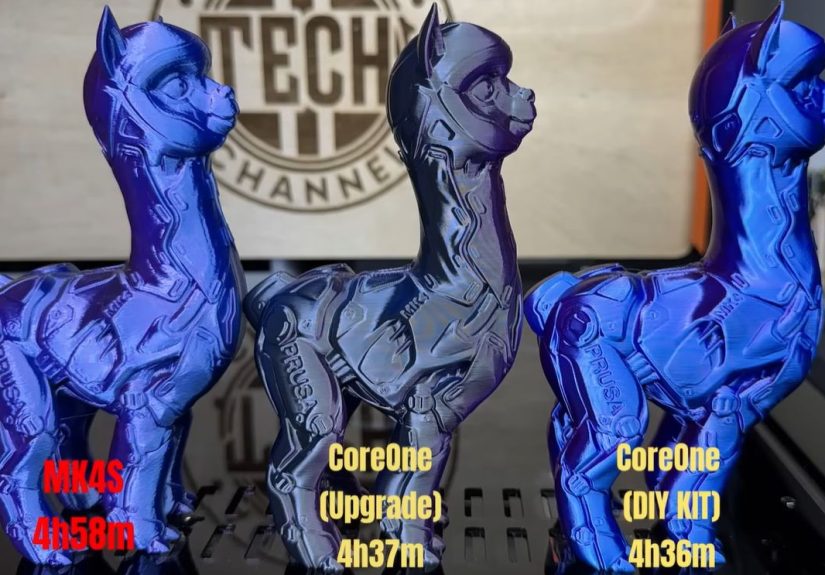
Speed only matters if it doesn’t wreck quality. In practice, CoreXY tends to handle higher accelerations more gracefully because the bed isn’t doing the tango on Y.
That can mean faster prints and cleaner surfaces on certain geometriesespecially tall or skinny objects where bed movement can amplify vibrations.
The best way to think about it: you’re not paying for “ludicrous mode.”
You’re paying for the ability to hit higher throughput without turning your printer into a percussion instrument.
4) A more space-efficient “enclosed solution” than boxing in an i3
Plenty of people enclose bed-slingers. It works. But it’s often bulky, awkward, and turns routine maintenance into a yoga sequence.
A printer designed to be enclosed from day one usually ends up more compact and better thought-out.
5) Workflow upgrades: production-minded design details
If you print a lotlike “my printer has a better work ethic than I do” a lotsmall things add up:
easier door access, consistent chamber behavior, better long-run stability, and a platform designed for scaling.
This is why enclosed CoreXY machines tend to show up in small businesses and print farms.
What you give up: the tradeoffs people gloss over
1) Open-frame convenience (a.k.a. “I can fix it in 30 seconds”)
The MK4S is wonderfully accessible. If something squeaks, rubs, or needs a tweak, you’re already there.
Enclosures are greatuntil you want to do something quick, like:
tighten a belt, wipe a rod, swap a fan duct, re-seat a connector, or retrieve that one screw that teleported into the void.
2) Conversion risk and downtime
Converting an MK4S to a CORE One is not “installing a new nozzle.”
It’s more like moving apartments: totally doable, but expect a few moments where you question every life choice that led you here.
The upgrade process takes real time, and mistakes can cause real frustration.
3) You might not see a “night and day” difference in PLA/PETG
This is the part that saves people money: if your world is mostly PLA, PETG, occasional TPU, and you’re already happy with speed/quality,
the upgrade can feel like buying a sports car to commute in traffic.
Cool? Yes. Necessary? Not unless you’ve got a reason.
4) Enclosures change the room experience
An enclosure can reduce drafts and help with fumes management (especially with filtration add-ons), but it also changes how you interact with the machine.
You’ll open doors less casually. You’ll think more about ventilation. You’ll care more about chamber temperature dynamics.
That’s great for advanced materialsjust different.
Cost math: conversion kit vs buying a CORE One vs doing nothing
Here’s the honest truth: the “best” decision is usually the one that matches your printing reality, not your printer daydreams.
Still, the numbers matter, so let’s do the grown-up part.
Typical paths people consider
- Keep the MK4S and spend $0 (the most underrated upgrade).
- Add an enclosure to the MK4S (helps materials, may be bulky).
- Buy a CORE One (kit or assembled) and keep the MK4S as a second printer.
- Convert the MK4S using the MK4S→CORE One conversion kit.
Example cost snapshot (approximate, before optional add-ons)
| Option | What you pay | What you get | Hidden costs |
|---|---|---|---|
| Keep MK4S | $0 | Same reliable printer | You still want a CORE One (emotionally) |
| Convert MK4S → CORE One | Conversion kit + your time | Enclosed CoreXY platform using many existing parts | Downtime, complexity, potential extra parts if compatibility issues |
| Buy CORE One kit | New printer kit price | Keep MK4S intact, gain a second machine | More space, more maintenance across two printers |
| Buy CORE One assembled | Higher upfront cost | Fastest path to printing | Still might buy add-ons (camera, filtration, etc.) |
Also, time matters: building a kit or doing the conversion is often described as an “evening plus a weekend morning” kind of project,
not a “before lunch” project. If your printer is part of your business or daily workflow, downtime is a real cost.
So… who should upgrade? The scenarios where it makes real sense
You should strongly consider the CORE One upgrade if:
- You print warp-prone, higher-temp materials regularly (ASA/ABS/nylon/PC) and want fewer failed prints and better dimensional consistency.
- You want an enclosure that’s designed-in, not a “furniture project” that turns your printer corner into a DIY greenhouse.
- You need more Z height for tall functional prints, organizers, brackets, enclosures, or prototypes you don’t want to split into six pieces.
- You value throughput and repeatability more than hands-on tinkering access.
- You enjoy mechanical projects and don’t mind disassembling a working printer to become an even better working printer.
You should probably keep your MK4S if:
- PLA/PETG is 90%+ of your life and your failure rate is already low.
- You love open access and quick maintenance matters more than enclosure benefits.
- You print occasionally and the MK4S already feels “fast enough.”
- Your budget is better spent elsewhere (filament, spare sheets, nozzles, a quality dryer, orwild thoughtrent).
The most honest summary:
If you don’t have a clear “why,” the MK4S is already the answer.
If you do have a clear “why,” the CORE One platform is designed to solve exactly those “why” problems.
Pre-upgrade checklist: what to confirm before you click “Add to cart”
1) Compatibility checks (don’t skip these)
- Power supply version matters: some PSU versions require additional parts/replacement to be compatible.
- xLCD version: the conversion kit may require selecting the correct option depending on your display electronics revision.
2) Plan your downtime like an adult
- Assume your printer will be out of commission for at least a day (possibly a weekend) if you take your time.
- If you run a small print business, schedule the conversion when orders are light.
- Take photos as you disassemble. Future-you will send past-you a thank-you card.
3) Decide if you’ll add “comfort” items now or later
- Camera: great for remote monitoring, especially for long advanced-material prints.
- Filtration: valuable if you print materials that smell or produce more ultrafine particles.
- Drybox strategy: enclosed printers + hygroscopic filaments (nylon) usually push you toward better filament storage.
4) Set realistic expectations
Upgrading won’t magically turn messy models into museum pieces.
What it does do is reduce the number of environment-related failures and improve consistency when printing materials that are picky about heat.
Think “less drama,” not “instant wizard.”
The 5-minute decision framework
If you want a fast yes/no without spiraling into spreadsheet land, answer these:
- Do I print ABS/ASA/nylon/PC often enough that failures cost me real time and money?
- Do I need (or strongly want) an enclosure that’s designed as part of the machine?
- Would extra Z height solve actual project constraints this month?
- Am I okay with downtime and a fairly involved conversion?
- If I don’t upgrade, will I still be happy printing next week?
If you answered “yes” to 1–3 and you can tolerate 4, the upgrade makes sense.
If you answered “yes” only to “Will I still be happy next week?” then congratulationsyou are emotionally stable and should keep the MK4S.
Conclusion
Upgrading a Prusa MK4S to a CORE One (or CORE One+) makes the most sense when you’re chasing
material capability, enclosure-driven reliability, and production-style consistencynot when you’re simply chasing novelty.
If your MK4S is already delivering great prints in PLA/PETG and you love the open-frame simplicity, sticking with it is not “settling.”
It’s choosing the right tool for your actual workflow.
But if you’re ready to print more demanding materials with less warping, want an enclosure that’s truly integrated, and like the idea of a CoreXY platform built for the long haul,
the conversion can be a smart, practical moveespecially if you’d rather upgrade than replace.
Experiences related to upgrading MK4S to CORE One (what it feels like in real life)
The most common “experience arc” people describe starts with confidence, dips into mild chaos, and ends in smug satisfaction.
Not because the conversion is impossiblebecause it’s the kind of project that rewards patience and punishes rushing.
If you’ve ever built a Prusa kit, you already know the vibe: clear steps, lots of screws, and a growing respect for cable management.
The first hour often feels great. You’re organized, you’ve got trays for fasteners, and you’re taking photos like a responsible documentarian.
Hours two through five are where reality shows up: you realize how many parts a “simple” printer actually contains, and you develop a new appreciation
for the fact that your MK4S worked perfectly before you touched it. This is also the phase where many folks recommend labeling cablesbecause everything looks obvious
until it absolutely does not.
Then comes the “enclosure moment.” Once panels and doors start going on, people often report that the machine suddenly feels more like a serious appliance.
The printer looks cleaner, the footprint feels more intentional, and the whole setup becomes easier to place in a shared spaceespecially if your printer lives
in a home office, a classroom, or a corner where you’d prefer it not to look like a robot octopus.
Printing experiences usually split into two buckets:
-
PLA/PETG users: The CORE One experience feels like “nice refinement.” Quieter operation (often helped by the enclosure), fewer draft-related surprises,
and a more “contained” workflow. The quality may look similar to what the MK4S already producedbecause the MK4S is already very goodbut you may notice
more confidence pushing speed without worrying about bed movement dynamics. -
ASA/ABS/nylon users: This is where people tend to sound genuinely relieved. The common story is fewer warped corners, fewer cracked layers on big parts,
and less fiddling with “what’s the room temperature today?” The chamber stability turns “I hope this works” into “this should work,” which is the whole point.
There’s also a psychological benefit that’s hard to quantify: once you trust the environment control, you stop hovering.
You’ll still check your first layer (because you’re not a monster), but you’re less likely to babysit hour three like it’s a suspense movie.
If you do long functional printsbrackets, mounts, jigs, enclosuresthat reduced anxiety can be worth more than a spec-sheet speed number.
The most balanced “experienced take” tends to be this:
the upgrade doesn’t replace good slicing, good filament, and good habitsbut it makes the printer more forgiving when the material is demanding.
If your goal is fewer failures and more reliable advanced-material output, it feels like a genuine upgrade.
If your goal is mostly “new toy energy,” you might end up realizing the MK4S was already doing the joband you just wanted a different-looking coworker.