Table of Contents >> Show >> Hide
- The Meme Behind the Headline (and Why It’s Actually Interesting)
- Quick Reality Check: Which “Llama 2” Are We Talking About?
- So… How Does DOS Run a Language Model at All?
- The Project That Made This Possible
- What Had to Change to Make “LLM on DOS” Real
- Benchmarks: How Fast Is “Llama 2 on DOS”?
- What Can You Actually Do With It?
- Why This Matters (Even If You Never Boot DOS Again)
- If You Want to Try the DOS Demo, Here’s the Practical Checklist
- Frequently Asked Questions
- Conclusion: The Most Chaotic Benchmark Is Also the Most Educational
- The Experience: What It’s Like to Run Llama 2 in DOS (Real-World Vibes)
There are two kinds of people in the world: the ones who see a cutting-edge AI model and ask,
“What problem does this solve?”… and the ones who ask, “Cool. But will it run on a 30-year-old beige box
that still thinks folders are a government conspiracy?”
If you’re in group two, congratulationsthis headline is your love language. Thanks to a clever port of a tiny
Llama 2-style inference program, you can now watch a “Llama 2” model generate text from inside DOS.
That’s right: the command prompt that once launched WordPerfect can now launch a language model.
The future is weird, and retro.
The Meme Behind the Headline (and Why It’s Actually Interesting)
“Will it run anything?” has been a hobbyist sport foreverpeople squeeze modern software into old
consoles, calculators, printers, and devices that were originally designed to beep once and die happy.
Running an LLM on DOS belongs in the same hall of fame, but it’s not just a novelty act. It’s a real reminder that:
- LLM inference can be shockingly portable when the code is minimal and the model is small.
- Most of the “magic” is math and memory movementthings old CPUs can still do, just slower.
- Efficiency isn’t just a cost-savings buzzword; it’s the difference between “impossible” and “it boots.”
Quick Reality Check: Which “Llama 2” Are We Talking About?
When most people say “Llama 2,” they mean Meta’s Llama 2 familylarge language models released
in multiple sizes (think billions of parameters). Those are the models that can power chatbots, coding helpers,
and all the other things your group chat won’t stop arguing about.
But DOS isn’t out here casually bench-pressing billions of parameters. The DOS story is mostly about a
Llama 2-architecture inference program running tiny Llama-like modelssome trained on
story-style datasetsbecause the point is proof-of-concept and portability, not replacing your daily assistant.
In other words: it’s like putting a jet engine on a go-kart. Still awesome. Just don’t expect transatlantic flights.
So… How Does DOS Run a Language Model at All?
1) The “One-File C” Philosophy
A big reason this works is that the underlying inference code is intentionally tiny and educational: a single-file,
dependency-light C implementation that can load a model checkpoint and generate tokens. Less “AI platform,”
more “here’s the math, enjoy.”
That minimalism matters on DOS, where every assumption you make about your runtime environment is a potential
trap door. If your program expects modern conveniences (memory mapping, long filenames, POSIX-y behavior),
DOS will politely laugh and then crash it.
2) The DOS “16-bit” Myth (and the 32-bit Escape Hatch)
Classic DOS has a reputation for tight memory limits and 16-bit constraints. That reputation is deservedbut it’s
also incomplete. Many DOS setups can run 32-bit programs using a DOS extender (and related protected-mode helpers),
letting software access far more memory than conventional DOS would allow.
That’s the key: language models are basically a traveling circus of matrix multiplications plus “please give me RAM.”
If you can get into a 32-bit protected-mode world and manage memory sanely, you can do a surprising amount of work
even if your CPU is older than some memes.
3) The Unromantic Truth: It’s Mostly Memory and Math
LLM inference is repetitive: read weights, multiply and add, apply activation functions, and repeat for each token.
On modern hardware, you get help from vector instructions, large caches, and sometimes a GPU. On DOS-era hardware,
you don’t get those luxuriesso you compensate by using smaller models and accepting slower generation.
The miracle isn’t “DOS is secretly fast.” The miracle is “small models + lean code + a workable memory strategy
can run basically anywhere.”
The Project That Made This Possible
The DOS breakthrough comes from a port of a minimal Llama 2-style inference program to run on
32-bit-capable DOS machines. The port focuses on DOS compatibility details: compiling with DOS-friendly
toolchains, swapping out modern OS-dependent features, and making the program behave in a world where file naming rules
and timing APIs are… let’s call them “historically spicy.”
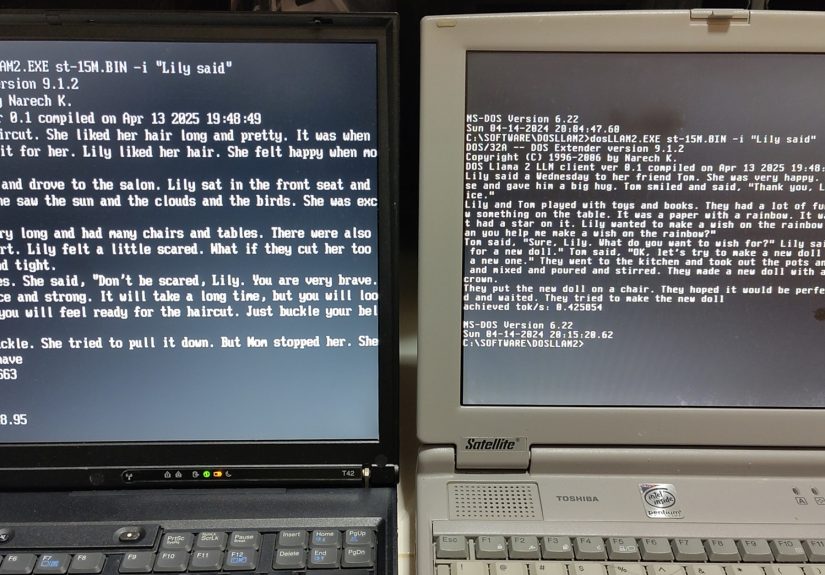
The result is a DOS executable that loads a small model checkpoint and generates text right in the terminal.
It’s the same basic experience you’d have on a modern machineprompt goes in, tokens drip outjust with more
retro charm and fewer gigabytes of VRAM.
What Had to Change to Make “LLM on DOS” Real
Ports like this are never just “compile and ship.” DOS is an alternate universe where some modern programming
conveniences don’t exist or behave differently. Here are a few of the biggest compatibility pain points and how they’re
typically handled:
Memory mapping? Not invited to this party
Many modern programs use memory mapping to treat files like big arrays in memory. DOS doesn’t make that easy, so ports
often switch to reading the model file directly into allocated memory. That’s fine for small models, but it’s also why
you’re not casually loading massive checkpoints.
Timing and benchmarking in a land before “high resolution” everything
Measuring performance sounds simple until your environment’s timing tools are… vintage. DOS-friendly timing approaches
exist, but they’re not the same as modern high-resolution timers. Benchmark numbers are still useful; you just interpret
them with the right expectations.
Filenames: welcome back to 8.3
DOS-style “8.3” filenames (up to 8 characters for the name and 3 for the extension) can require small but annoying
changeslike renaming large model files so the program can find them without a meltdown.
This is the kind of detail that makes retro ports delightful: your futuristic AI demo might fail because your filename
is too long. That’s not a bug; that’s a time machine.
Benchmarks: How Fast Is “Llama 2 on DOS”?
Speed depends heavily on CPU class and model size. With tiny models, you can get a few tokens per second on older
hardwareand significantly more on later DOS-era CPUs. With larger “tiny” models, generation can drop below “comfortable
conversation speed,” but it still runs, which is the whole point.
Here’s how to think about it:
- Smallest models can feel surprisingly responsive, especially on later Pentium-class systems.
- Mid-size tiny models can be slow but still fun for short generations or demos.
- Bigger models quickly become “patience training,” because DOS-era CPUs weren’t built for this workload.
The real takeaway isn’t a specific number. It’s that the performance curve is exactly what you’d expect:
tokens-per-second rises with faster CPUs and falls with bigger modelsno magic, just physics and math.
What Can You Actually Do With It?
Let’s set expectations properly: a tiny Llama 2-architecture model running in DOS isn’t going to replace your everyday
assistant. But it can still do real, entertaining thingsespecially the kinds of things tiny models are good at:
Micro-story generation (the classic demo that never gets old)
Tiny story-trained models can produce short narratives, little scenes, and whimsical continuations. The DOS terminal
becomes a story fountainslow, yes, but undeniably charming.
Prompt experiments that feel like retro “procedural text” games
If you grew up with text adventures, you’ll recognize the vibe: type a prompt, watch text appear, and let your brain
fill in the rest. It’s not “AI roleplay,” it’s more like “interactive imagination with a CPU fan soundtrack.”
Offline tinkering and education
Minimal inference code is a great teaching tool. Seeing it run in DOS makes it even clearer that inference is not
mystical cloud fogit’s deterministic computation. That’s useful for students, hobbyists, and anyone who enjoys
understanding how things work.
Why This Matters (Even If You Never Boot DOS Again)
1) It’s a masterclass in efficiency
Modern AI often grows by throwing more compute at the problem. Retro ports flip the script: when compute is scarce,
you optimize the model size, the code path, and the memory layout. That mindset is becoming relevant again for edge
devices, low-power deployments, and cost-conscious applications.
2) Portability is a feature, not a flex
When a model can run in a tiny C program on a weird environment, it becomes easier to embed that model in unexpected
placesindustrial systems, offline tools, constrained devices, or educational sandboxes. DOS is the extreme example,
but the principle generalizes.
3) It highlights the difference between “LLM architecture” and “LLM scale”
The architecture ideas can travel fareven to DOS. The scale (billions of parameters) is what demands modern hardware.
Keeping those separate helps people reason about what’s possible where, and why “small model” work is still valuable.
If You Want to Try the DOS Demo, Here’s the Practical Checklist
If you’re tempted to try this yourself, here’s what typically matters most:
Hardware and OS basics
- A 32-bit-capable DOS machine (or an emulator/VM configured for DOS).
- Enough RAM to load the model file into memory (more model = more RAM).
- Storage space for the model checkpoint file.
Model choice
- Start with the smallest model checkpoint you can find for the demo.
- Only move up once you’re sure it loads and runs reliably.
- Keep generations short while you testDOS-era patience is a limited resource.
DOS quirks to remember
- Use 8.3-friendly filenames for model files and folders when needed.
- Expect longer load times; old I/O can be the hidden boss battle.
- Don’t judge the model harshlytiny checkpoints aren’t meant to be “smart,” they’re meant to be runnable.
Frequently Asked Questions
Is this the same as running a full Llama 2 chatbot?
Not really. The DOS demo is typically running a much smaller model that uses a Llama 2-style architecture.
Full-scale Llama 2 models (the multi-billion-parameter kind) are a different level of resource demand.
Why not just use a modern OS?
Because the point isn’t practicalityit’s exploration. Retro ports teach constraints, portability, and efficiency.
Also, it’s fun. Sometimes “fun” is the whole engineering requirement.
Does the output look good?
For tiny models, output can be charming, surprisingly coherent in short bursts, and occasionally hilarious. It can also
go off the rails. That’s normalsmall models trade breadth for runnability.
What’s the biggest bottleneck?
Typically compute speed and memory bandwidth, plus the raw cost of loading and using model weights. Bigger models mean
more data to move and more math to doboth are expensive on older CPUs.
Conclusion: The Most Chaotic Benchmark Is Also the Most Educational
“Will it run Llama 2?” sounds like a joke until you see it happen: a DOS prompt generating tokens from a neural network
checkpoint like it’s 1996 and 2096 at the same time. The stunt works because the underlying ideastransformer-style
inference, carefully packaged weights, and a tight runtimeare more portable than people assume.
DOS running a Llama 2-style model won’t change enterprise roadmaps. But it absolutely changes how you think about
constraints. And if it makes you grin while your vintage PC thinks very hard about the next word in a tiny story,
that’s a perfectly valid definition of progress.
The Experience: What It’s Like to Run Llama 2 in DOS (Real-World Vibes)
If you’ve never tried one of these retro AI demos, the experience is equal parts “science project” and “time travel.”
You boot up DOS (or a DOS-like environment), and it feels instantly familiar: a blinking cursor, short commands,
and that quiet confidence DOS haslike it’s certain the internet was a fad and will apologize any minute now.
Then you run the program, and the first moment of joy is often surprisingly small: a banner line, a memory message,
or a quick confirmation that the executable launched without instantly complaining about missing DLLs (a luxury DOS
doesn’t even believe in). If a DOS extender is involved, you’ll often see a hint that you’re operating in a 32-bit
world nowa little backstage pass that makes the whole trick possible.
Next comes the “retro reality check”: model files. On modern machines, you’d casually drop a checkpoint into a folder
named something like models/llama2-stories-15m-v2-final.bin. In DOS land, that name is basically a novel.
You rename it. You rename it again. You feel a strange sense of pride when you settle on something like
STOR15M.BIN and it finally works. It’s the first reminder that this isn’t a cloud demoit’s a negotiation
with history.
Loading the model can feel like waiting for a microwave that refuses to beep. On real vintage hardware, you may hear
storage access chattering away while the program pulls weights into memory. In an emulator, it might be quicker, but
you still sense the “bulk” of the file. This is the part where you realize why tiny models matter: every extra megabyte
is extra time, extra memory pressure, and extra opportunities for something to go sideways.
And then it happens: tokens begin to appear. Not all at once like a modern chat UImore like a slow typewriter with a
math degree. The text scrolls out in a steady drip, and it’s oddly mesmerizing. You start to read differently. You stop
expecting paragraphs and start appreciating phrases. When it produces a coherent sentence, it feels like a tiny miracle.
When it produces a weird sentence, it feels like the machine is doing performance art in ASCII.
You also learn new patience metrics. On a fast modern machine, “latency” is measured in milliseconds. On DOS-era gear,
you start measuring in “sip intervals”: sip of water, token appears; sip again, punctuation; sip again, the model decides
the story needs a giraffe. If you ask for too many tokens, you’ll understand why early computing culture prized short,
punchy outputs. Suddenly, a 100-token story feels like a full-length feature film.
The most fun part is experimentation. You try prompts that fit the vibe: bedtime stories, goofy characters, tiny scenes.
You learn what the model “likes” and what it can’t handle. You discover that small changes in temperature or prompt
wording can swing the output from sweet to chaotic. And by the end, you don’t just feel like you ran an LLM on DOSyou
feel like you met the constraints that modern AI usually hides from you.
That’s the real payoff. The demo isn’t about making DOS practical again. It’s about making the machinery of language
models visible. DOS strips away the glossy UI and leaves you with the fundamentals: files, memory, math, and time.
And somehow, watching a tiny “Llama 2” generate words from a blinking prompt makes the whole field feel more tangible
and a lot more human.