Table of Contents >> Show >> Hide
- Why sports are the toughest test for a TV
- What refresh rate actually means
- Native refresh rate vs. marketing fluff
- Why 120Hz still matters if many sports feeds are around 60Hz
- Refresh rate is important, but it is not the whole game
- Which type of TV is best for sports?
- Picture settings that can improve sports viewing
- A simple buying checklist for sports fans
- What the experience actually feels like in real homes
- Final verdict
- SEO Tags
Buying a TV for sports sounds easy until the first fast break, slap shot, or deep ball turns into a blurry smear of grass, jerseys, and regret. A set can look fantastic in a showroom while playing a slow demo reel of waterfalls and sunsets, then completely lose the plot once real-life action starts flying across the screen. That is why one spec deserves special attention before you buy: refresh rate.
If you watch football, basketball, hockey, baseball, racing, soccer, or pretty much anything involving speed and a commentator who sounds like they drank three espressos, refresh rate matters. It affects how smoothly motion appears and how clearly your TV handles fast-moving scenes. In plain English, it helps determine whether you see the ball, the puck, or just a vague little comet streaking across the screen.
But refresh rate is also one of the most misunderstood TV specs. Retail listings toss around terms like Motion Rate, TruMotion, and Motionflow like confetti, while buyers are left wondering whether a 60Hz TV is fine, a 120Hz TV is necessary, and whether 144Hz is a bonus or just a flex. The good news is that this is not nearly as complicated as the TV industry would like it to be.
Here is the short version: if sports are a top priority, a TV with a native 120Hz refresh rate is usually the better choice. It will not magically turn every broadcast into a cinematic masterpiece, but it gives your TV a much better shot at handling motion cleanly and keeping fast action from looking mushy. And yes, that matters more than most people realize.
Why sports are the toughest test for a TV
Sports expose weaknesses that casual sitcom watching politely ignores. In a drama, people mostly sit in rooms and exchange tension. In sports, the entire frame can change in a split second. Cameras pan quickly. Crowds flicker in the background. Bright uniforms race across textured fields and courts. Score graphics stay pinned to the screen while everything behind them moves. It is basically a stress test disguised as entertainment.
That means a good sports TV needs to do several things at once. It has to keep motion smooth. It has to minimize blur and ghosting. It has to stay bright enough for daytime viewing. It has to preserve detail when the camera moves quickly. And if you have friends over for the game, it also helps if people sitting off to the side can still see the picture without the colors washing out like a cheap beach towel.
This is why a TV that looks “pretty good” for streaming a sitcom at night can suddenly seem disappointing during Sunday football. Sports do not just ask for picture quality. They ask for motion quality. That is where refresh rate enters the chat, wearing cleats.
What refresh rate actually means
A TV’s refresh rate tells you how many times the screen can update the image every second. It is measured in hertz, or Hz. A 60Hz TV refreshes the image up to 60 times per second. A 120Hz TV can refresh up to 120 times per second. The higher number gives the TV more opportunities to display motion cleanly and smoothly.
60Hz vs. 120Hz for sports
If you mainly watch news, talk shows, and slower-moving content, 60Hz can be perfectly acceptable. But sports are different. Fast action benefits from the extra smoothness and motion handling a native 120Hz panel can provide. Pans across a football field look cleaner. Hockey benefits even more because the puck is tiny, fast, and apparently committed to chaos. Basketball also looks better because rapid camera shifts and quick player movement can reveal blur on weaker panels.
That does not mean a 60Hz TV is automatically bad. Some 60Hz models still look decent, especially if you sit farther back or mostly watch casual games rather than obsessing over every pass. But if your goal is to buy a TV for sports, not merely a TV that occasionally tolerates sports, then 120Hz is the safer bet.
Native refresh rate vs. marketing fluff
This is the part where TV marketing puts on a fake mustache and tries to confuse you.
When shopping, you may see terms like Motion Rate 240, TruMotion 240, Motionflow XR, or some other glorious number that sounds like it belongs on a race car. These labels are not always the same thing as a TV’s native refresh rate. In many cases, they are marketing names for motion processing systems, backlight tricks, or calculated values rather than the actual panel refresh rate.
That is why the phrase you want to look for is native 120Hz. Not “effective,” not “clear motion,” not “turbo awesome ultra sports mode.” Native 120Hz. If a retailer or manufacturer page does not clearly say the panel is 120Hz, assume nothing and dig deeper.
This one step alone can save you from buying a set that sounds fast on paper but is really a 60Hz TV wearing a fake mustache and aviator sunglasses.
Why 120Hz still matters if many sports feeds are around 60Hz
Here is where people often get tripped up. They hear that many live TV sports feeds in the U.S. are effectively delivered at around 60 frames per second or use broadcast formats like 720p or 1080i, and then conclude that a 120Hz TV is pointless. Not so fast.
A native 120Hz TV still has advantages even when the source is not true 120fps content. First, it has more refresh cycles available to handle motion cleanly. Second, it often comes with better processing, which matters a lot for sports. Third, TVs with native 120Hz panels are typically positioned a tier above entry-level models, so they often bring better motion interpolation, better upscaling, better response times, and better overall picture performance.
In other words, buying a 120Hz TV for sports is not just about chasing a bigger number. It is about buying into a class of TVs that usually handles motion better in the real world.
That said, do not expect miracles. A soft broadcast will still be a soft broadcast. A 120Hz TV cannot invent detail that was never in the feed. What it can do is make motion look cleaner and reduce the blur and smear that make sports frustrating to watch on cheaper sets.
Refresh rate is important, but it is not the whole game
If you stop shopping the moment you see “120Hz,” you are only halfway home. A good sports TV depends on several related factors.
1. Motion processing
This is the TV’s ability to reduce blur and smooth motion. Some brands do this better than others. Motion interpolation can be especially useful for sports because it can make fast action appear clearer. The catch is that aggressive motion smoothing can make movies and scripted shows look weirdly glossy and unnatural. The fix is simple: use a moderate sports-friendly motion setting for games, then dial it back for movies.
2. Response time
Refresh rate and response time are not the same thing. Refresh rate is how often the screen updates. Response time is how quickly pixels change. A TV can have a high refresh rate and still struggle if pixel transitions are slow. For sports, slow response time can create ghosting or smearing. This is one reason OLED TVs are loved by sports fans: pixel response is extremely fast.
3. Brightness
Watching the early game in a bright room is a different experience from watching a late-night movie in a dark den. If your living room gets a lot of daylight, brightness matters. A bright Mini-LED or QLED-style TV can hold up better against sunlight and overhead lights. If your room is bright and reflective, the best motion in the world will not help if the screen turns into a mirror every time someone opens the curtains.
4. Anti-glare performance
Sports are often social viewing events, which means daytime watch parties, open blinds, and lamps on. Anti-glare coatings and strong reflection handling make a real difference. A TV with great contrast but poor reflection control can still be annoying for sports in a bright room.
5. Viewing angles
If you usually watch alone from dead center, this matters less. If you host people for playoff games, it matters a lot. Wider viewing angles keep colors and contrast from fading when people sit off to the side. OLEDs usually shine here. Some premium LED and Mini-LED sets do a decent job too, but cheaper LCD TVs can look noticeably worse from an angle.
6. Upscaling and broadcast cleanup
Not all sports content is pristine 4K glory. A lot of it is still compressed cable, satellite, or streaming content. Good upscaling and picture processing help lower-resolution feeds look cleaner on a big 4K screen. If you watch a lot of live sports, strong processing can matter almost as much as the panel itself.
Which type of TV is best for sports?
There is no single answer for everyone, because the best TV for sports depends on your room and habits.
OLED: best for motion lovers and wide seating
If you want fantastic motion clarity, great viewing angles, deep contrast, and a premium picture, OLED is hard to beat. Sports can look wonderfully crisp and immersive on an OLED, especially in a room where glare is controlled. If you care about seeing the game clearly from multiple seats, OLED is a terrific choice.
Mini-LED or bright QLED-style TVs: best for sunny rooms
If your room is bright and the TV has to fight sunlight, a bright Mini-LED or QLED-style set may be the smarter pick. These TVs can get punchy enough to stay visible during daytime games and often combine high brightness with strong sports performance. They may not match OLED’s viewing angles or pixel response, but in a bright family room they can be the most practical winner.
Budget 60Hz TVs: okay for casual fans, risky for die-hards
If you are on a tight budget, a 60Hz TV is not automatically a disaster. It can still be fine for mixed use and casual sports watching. But if sports are one of the main reasons you are upgrading, this is where spending a little more often pays off. The jump from “fine enough” to “wow, that actually looks smooth” is usually easier to see in sports than in slower content.
Picture settings that can improve sports viewing
Even a great TV can look mediocre if the settings are a mess. Fortunately, sports-friendly tweaks are not complicated.
- Start with a natural picture mode: Cinema, Movie, Standard, or Custom often works better than torch-mode showroom settings.
- Use moderate motion enhancement: For sports, a little blur reduction or motion smoothing can help. Just do not crank it to maximum unless you enjoy your football looking like a soap commercial.
- Adjust brightness for the room: Daytime games may need more brightness than nighttime viewing.
- Turn off unnecessary processing if the image looks strange: Too much enhancement can create halos, artifacts, or weirdly slick movement.
- Check your streaming device and app settings: Sometimes the bottleneck is not the TV at all. It is the stream, the app, or the box.
A simple buying checklist for sports fans
If you want the practical version, here it is:
- Look for a native 120Hz panel.
- Check how the TV handles motion blur and fast action.
- Match the TV type to your room: OLED for darker rooms, bright Mini-LED or QLED-style models for sunny rooms.
- Pay attention to reflection handling and viewing angles.
- Do not trust inflated marketing numbers without verifying the native refresh rate.
- If you watch a lot of cable or streaming sports, prioritize good processing and upscaling.
What the experience actually feels like in real homes
On paper, refresh rate can sound like one of those specs only forum obsessives argue about at 1:12 a.m. But in real homes, the difference is surprisingly easy to notice once you know what to look for.
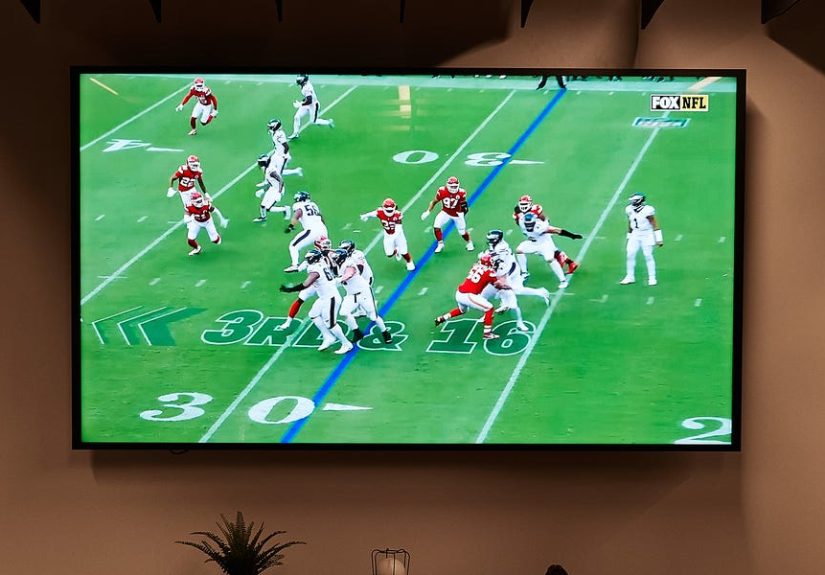
Imagine a Saturday afternoon football game on a basic 60Hz TV in a bright living room. The overall picture may seem fine when the players line up before the snap. Then the camera follows a deep pass. Suddenly the field texture softens, the crowd turns into a noisy blur, and the receiver looks just a little smeared as he cuts across the frame. Nothing is totally broken. It just feels less sharp, less stable, and a little more tiring to watch over the course of a full game.
Now picture that same game on a stronger native 120Hz set with solid motion handling. The image still is not magic, and the broadcast feed is still the same feed, but the movement feels more controlled. Pans are cleaner. Jerseys hold together better. Yard lines remain easier to track. The screen looks less like it is struggling to keep up and more like it actually understands the assignment.
Hockey is where many people notice the difference fastest. Hockey is not subtle. The puck is small, the ice is bright, the camera moves fast, and your TV either keeps up or waves a white flag. On weaker sets, the puck can disappear into blur during rapid movement. On better 120Hz TVs with strong motion processing, it is simply easier to follow the action. You still need good eyesight and maybe a snack break, but at least the TV is no longer working against you.
Basketball offers another real-world lesson. Fast transitions from defense to offense, sweeping camera moves, and lots of detailed background elements can make some TVs look messy. A better sports TV does not just make the game prettier. It makes it easier to watch comfortably. You spend less time squinting at motion and more time reacting to the actual play.
Then there is the room itself. Plenty of buyers focus only on specs and forget that the viewing environment can change everything. A gorgeous OLED can look phenomenal during a night game, with rich contrast and excellent motion. But put that same TV across from a wall of sunny windows during an afternoon kickoff, and suddenly glare becomes the star of the show. In that situation, a brighter Mini-LED or QLED-style TV may produce the better everyday sports experience, even if the OLED wins in a dark-room showdown.
Seating also matters more than people expect. Sports are social. Maybe not every game, but the big ones tend to come with extra people, extra chairs, and at least one person standing in the kitchen pretending they can still see the screen. A TV with better viewing angles keeps the picture more consistent for everyone. That alone can make a watch party feel more premium, because the people off to the side are not stuck watching a faded version of the game.
There is also the subtle satisfaction factor. A better sports TV just feels calmer. The image holds together better under pressure. Camera sweeps look more polished. Fast action feels intentional instead of chaotic. And once you get used to that smoother, cleaner presentation, going back to a cheaper 60Hz set for live sports can feel like stepping from a highway onto a pothole-filled side road.
That is the real takeaway from all these “TV for sports” discussions. Refresh rate is not just a spec sheet trophy. It affects the day-to-day experience in ways regular viewers can actually see. You do not need to be a videophile, calibrator, or part-time astronaut to notice it. If you watch enough sports, your eyes will tell you the truth pretty quickly.
Final verdict
If you are buying a TV specifically for sports, check the refresh rate before you fall in love with anything else. A native 120Hz TV is usually the smarter buy for fast-moving live content because it gives you smoother motion, cleaner panning, and a better overall shot at reducing blur. It will not fix a bad broadcast or transform every stream into native 4K brilliance, but it will put you in a better class of performance where sports simply look more convincing.
From there, match the rest of the TV to your room. Dark room and wide seating? OLED is a star. Bright room with lots of daylight? A bright Mini-LED or QLED-style set may be the more practical MVP. And above all, do not get fooled by flashy marketing terms. When in doubt, verify the native refresh rate.
Because when the game is on the line, the last thing you want is your TV fumbling the ball.