Table of Contents >> Show >> Hide
- From Exotic Hobby to Accessible Cockpit
- Hacking the Skies: Talking Flight Monitor and Audio-First Design
- The Hardware Revolution: Adaptive Controllers and Custom Rigs
- Inside an Accessible Flight Sim Setup
- Why Accessible Flight Simulation Matters
- How to Start “Flying Blind” (Safely)
- Real-World Experiences: What It Feels Like to Fly Without Sight
- Conclusion: The Skies Are Finally Open
In most flight simulators, the first rule of flying is simple: if you can’t see the cockpit, you can’t fly the plane.
For blind and low-vision players, that’s a pretty brutal loading screen. Yet in the last few years, a mix of clever
software hacks, adaptive hardware, and a passionate community has quietly rewritten that rule. You no longer need
perfect eyesightor even any eyesight at allto take off, navigate busy airspace, and grease a landing on a short runway.
The Hackaday story “Flying Blind: Taking Flight Simulation To A New Level In Accessibility” put a spotlight on this
revolution, highlighting how tools like Talking Flight Monitor and customized aircraft panels let completely blind
sim pilots fly complex airliners with confidence. What started as a niche hobby has turned into a testbed for inclusive
design, accessible gaming, and seriously impressive DIY engineering. Today, flight simulation accessibility is no longer
a nice-to-haveit’s becoming a benchmark for how games and technical software should treat disabled players.
From Exotic Hobby to Accessible Cockpit
Flight simulation has always been a bit of a “maximum settings” hobby. Multiple monitors, dedicated yokes and throttles,
button boxes, pedals, head tracking, and a forest of USB cables used to be the norm. The default assumption was that the
pilot had excellent vision and fine motor control. If you couldn’t visually scan gauges, read tiny text labels, and hit
the right toggle in a hurry, the sim wasn’t built for you.
That model is changing. Mainstream titles like Microsoft Flight Simulator now ship with robust accessibility menus on
both PC and console, offering narrator support, scalable UI, customizable subtitles, interface contrast options, and
granular assistance for everything from taxiing to landing. Instead of one monolithic “difficulty” slider, players can
choose how much help they want with checklists, navigation, camera control, and radio comms. The simulator becomes
more like a flexible training environment than a rigid exam.
Why Traditional Flight Sims Locked People Out
Classic simulators assumed three things: you could see the screen, you could read small text, and you could physically
operate a standard joystick or yoke. For players who are blind, have low vision, limited mobility, or fine-motor issues,
that combination is a perfect storm of exclusion. Cockpit layouts are incredibly dense, with dozens of critical controls
clustered in tight spaces. Instrument readouts rely heavily on tiny fonts, color coding, and visual movement, all of
which are useless if you’re relying on a screen reader or audio cues alone.
On top of that, keyboard shortcuts and controller bindings were designed for sighted players who could memorize and
visually confirm what each key or button did. Accessibility options were typically bolted on as afterthoughtsif they
existed at all. For years, the best many blind players could hope for was listening to engine sounds and imagining the
flight, rather than actually flying the aircraft in a meaningful way.
Hacking the Skies: Talking Flight Monitor and Audio-First Design
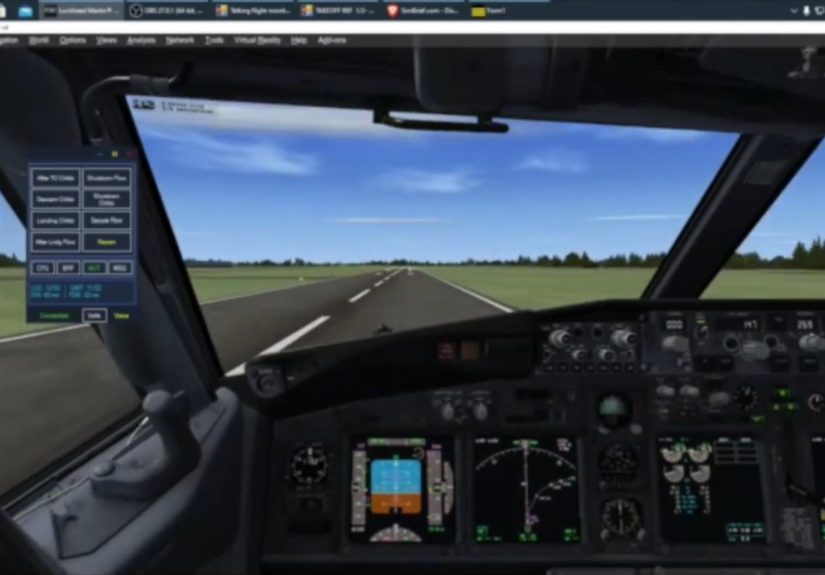
The breakthrough came from the accessibility and sim communities themselves. Talking Flight Monitor (TFM), the star of
the Hackaday piece, is an add-on that connects to popular flight simulators and exposes cockpit data in a screen-reader–
friendly way. Instead of visually scanning the panel, blind sim pilots hear spoken feedback for altitude, heading,
speed, vertical speed, radio frequencies, and more. With smart keyboard shortcuts, they can “interrogate” the aircraft
state at will, just as a sighted pilot glances at the gauges.
These tools don’t dumb down the simulationthey translate it. Accessible control panels for complex airliners like the
737 and 777 reorganize controls into text-driven interfaces. Actions like setting flaps, dialing in an ILS frequency,
arming the autothrottle, or configuring approach modes become keyboard-driven commands with immediate audio confirmation.
The result is a cockpit experience that’s different from the default layout but equivalent in depth and challenge. You’re
not “pretend flying”; you’re genuinely managing an advanced aircraft with non-visual tools.
Eurofly and Other Audio-First Flight Sims
While add-ons like TFM retrofit accessibility onto visually rich simulators, some projects flip the equation and start
from audio first. Eurofly, for example, is a flight simulator built specifically for blind and visually impaired gamers.
Instead of relying on visuals, it uses layered audio cues, spoken navigation data, and keyboard-centric interaction to
represent everything from taxiways to cruise altitude. The focus is on mental mapping rather than screen scanning, and
it shows just how rich a “no graphics required” flight sim can be.
Audio-first designs like this make an important point: accessibility isn’t just about bolting text-to-speech on top of
an existing interface. It’s about rethinking how information is presented. In a real aircraft, pilots already rely heavily
on audioradio calls, callouts, alarms, and crew coordination. Accessible sims simply lean harder into those cues and make
them precise, configurable, and repeatable.
The Hardware Revolution: Adaptive Controllers and Custom Rigs
On the hardware side, accessible flight simulation has ridden the same wave as accessible gaming in general. Devices like
the Xbox Adaptive Controller (XAC) and the newer Adaptive Joystick turn a tangle of small buttons and sticks into a
flexible input hub. Instead of being forced to grip a standard gamepad, players can plug in larger switches, foot pedals,
sip-and-puff devices, or custom joysticks arranged exactly where they’re easiest to use.
For flight simulation, this is ideal. Rudder pedals can be replaced with hand-operated levers. Throttle controls can be
moved to a wheelchair armrest. Large, well-spaced buttons can handle critical controls like landing gear, flaps, or
push-to-talk. The hardware no longer assumes a particular body shape or range of motion; it simply routes inputs from
whatever devices make sense for that pilot.
Adaptive Cockpits and Shared Builds
Microsoft and partners have even built adaptive cockpits: portable rigs with wide openings, adjustable mounts, and
multiple monitors arranged for maximum visibility and comfort. These setups are designed to be wheelchair accessible
and flexible enough to support a range of input devices. They’re often used at events or maker spaces to give disabled
players their first hands-on taste of flying a virtual airliner without needing to purchase and configure an entire
home cockpit.
Meanwhile, the home-sim community shares endless photos and build logs of custom cockpits: multi-monitor towers,
touchscreens displaying instruments, 3D-printed panels, and intricate wiring diagrams. As accessibility becomes a more
common design goal, these rigs increasingly include details like lower-mounted panels, voice control integration, and
modular hardware that can be repositioned quickly for different pilots. What used to be a one-person shrine to aviation
is turning into a genuinely inclusive shared simulator.
Inside an Accessible Flight Sim Setup
So what does a modern, accessibility-focused flight sim setup actually look like? Imagine a mid-range PC or Xbox,
running Microsoft Flight Simulator with accessibility options enabled: screen narrator, scalable UI, clear subtitle
settings, and assist sliders tuned to the pilot’s preference. Instead of a standard controller, an adaptive controller
sits on the desk, wired to large external switches, paddles, or joysticks that are easy to reach.
On the software side, an add-on like Talking Flight Monitor bridges the gap between the sim and the screen reader,
providing precise spoken feedback for flight parameters. Keyboard shortcuts trigger actions like “report altitude,”
“announce nearest airport,” or “read out autopilot status.” The sim’s built-in AI co-pilot might handle radio traffic
or even take over flying during high workload moments, while the player issues high-level commands and monitors
progress through audio.
Smarter Software: Assists, Automation, and Virtual Co-Pilots
Modern sims are packed with automation toolsautopilots, flight directors, auto-throttle systemsthat real pilots use
every day. For disabled players, these aren’t cheats; they’re accessibility features. The ability to let the sim handle
takeoff or landing while you manage navigation and systems is no different from using cruise control in a car while
focusing on steering.
Microsoft Flight Simulator also supports an AI co-pilot that can manage checklists, radio calls, traffic avoidance, and
even entire flight segments. Combined with accessible add-ons, this co-pilot becomes more like a guide than a babysitter:
it fills in the gaps where quick manual inputs are difficult, while leaving strategic decisionsroute, altitude, weather,
and flight planningsquarely in the hands of the player.
Why Accessible Flight Simulation Matters
It’s tempting to see accessible flight simulation as “just” entertainment. But for many blind and disabled players, it’s
a rare space where they can inhabit a role that society often assumes is off-limits: pilot in command. A realistic sim
offers genuine cognitive challengeplanning routes, managing fuel, interpreting navigation data, and handling unexpected
situations like crosswinds or system failures. That’s a very different experience from the simplistic, low-agency games
that disabled players have frequently been stuck with.
There’s also a training angle. While a home simulator won’t turn a blind player into a licensed airline captain, it can
support STEM learning, spatial reasoning, and an intuitive feel for how aircraft behave. For sighted disabled players
who do have some path into real-world aviationsuch as gliding, ultralights, or ground-based rolesaccessible sims can
provide serious practice and confidence. Even for those who will never sit in a real cockpit, the sense of mastery and
autonomy is real and deeply meaningful.
How to Start “Flying Blind” (Safely)
Getting into accessible flight simulation doesn’t require selling a kidney for hardware. The basics are straightforward:
a PC or console that can run a modern simulator, a copy of the sim itself, and a screen reader if you’re blind or
low-vision. From there, the accessibility stack scales with your interest and budget. Start with keyboard and screen
reader integration. Add in an adaptive controller if you need more ergonomic controls. Layer on specialized add-ons
like Talking Flight Monitor once you’re ready to dive into more complex aircraft.
The key is community. Forums, Discord servers, and accessibility-focused websites are packed with setup guides,
pre-made controller profiles, and troubleshooting tips. Blind pilots share which aircraft work best with TFM today,
which airports are easier to navigate by audio, and which control bindings feel most intuitive. It’s like getting
checked out by an instructorexcept your instructor might be halfway across the world, flying the same route through
nothing but spoken instruments and imagination.
Real-World Experiences: What It Feels Like to Fly Without Sight
To understand why accessible flight simulation hits so hard, it helps to picture what the experience actually feels like
from the pilot’s seatespecially when that seat belongs to someone who can’t see the screen at all. Imagine booting the
sim and hearing not a chaotic jumble of audio, but a structured flow: your screen reader announces menus, TFM reports
the currently loaded aircraft, and a key press tells you the departure airport and runway. You haven’t seen a pixel, but
you already know more than many sighted beginners do.
Take Sam, for examplea composite of many blind sim pilots whose stories echo the same beats. Sam grew up obsessed with
aviation podcasts and radio chatter but assumed flying, even virtually, was out of reach. The first time Sam loaded a
sim with Talking Flight Monitor enabled, the experience was disorienting but thrilling. Altitude reports ticked up in
100-foot increments as the plane accelerated down the runway. A spoken “rotate” callout signaled the moment to pull
back. The climb felt real not because of visuals, but because of the rhythm of engine sounds, airspeed reports, and
callouts from the co-pilot.
At cruise, Sam learned to “feel” the airplane through audio. A subtle change in engine pitch hinted at turbulence.
Heading and track reports provided a mental compass. Crossing a navigational fix wasn’t a dot on a mapit was a spoken
waypoint name followed by a confirmation that the aircraft had turned to the new heading. When air traffic control
instructions came in as synthesized speech or scripted events, Sam responded with key commands that changed altitude,
speed, or route. It’s a dance between human and machine, choreographed entirely through sound.
Landing is where the emotional payoff lands, too. Instead of lining up using a visual runway, blind pilots rely on
localizer and glideslope data read aloud at intervals, combined with callouts on distance to the threshold and descent
rate. The first time everything clicksgear down, flaps set, speed on target, descent stabilizedthe landing roll feels
like a personal victory. You hear the thunk of the wheels, the roar of reverse thrust, and then the calm of taxi speed.
For many blind sim pilots, that moment is less about “pretending to be a pilot” and more about proving to themselves
and others that complex, technical systems are not off-limits.
These experiences ripple outward. Some players use accessible sims as social glue, flying with friends in multiplayer
sessions or joining virtual airlines that assign routes and schedules. Others use them as a form of meditation and
escapismlong-haul flights at night, cruising above virtual clouds while listening to audiobooks or music between
critical phases of flight. And many simply enjoy the satisfaction of continuous improvement: shaving a few feet off
their landing float, nailing that crosswind, or finally mastering a tricky instrument approach using only non-visual
tools.
What ties all of these stories together is agency. Accessible flight simulation doesn’t ask disabled players to sit in
the jump seat and watch. It hands them the controlsliterally and figurativelyand says, “Here, you fly.” That simple
act transforms the sim from a game into a powerful statement about inclusion: if we can make a full-fidelity airliner
accessible to blind players, there’s no excuse for everyday software and games to remain stuck in the past.
Conclusion: The Skies Are Finally Open
“Flying blind” used to be a warning. In the world of modern flight simulation accessibility, it’s becoming a badge of
honor. Thanks to screen-reader–aware add-ons, adaptive controllers, inclusive cockpit designs, and relentlessly curious
hackers, blind and disabled players can now step into roles that once seemed impossible. They can plan routes, command
complex aircraft, and share airspace with friends around the worldall without relying on a single pixel.
This shift isn’t just great news for sim fans; it’s a roadmap for accessible tech everywhere. When developers treat
accessibility as a core design challenge rather than a checkbox, the results are better for everyone. Flight simulators
become richer, more flexible, and more human. And somewhere, a new pilot who’s never seen the sky is lining up on final,
perfectly on glideslope, ready to prove that “flying blind” can mean flying brilliantly.