Table of Contents >> Show >> Hide
- What Is Abode Home Security?
- Abode Equipment and Starter Kits
- Monitoring Plans and Monthly Costs
- Smart-Home and Voice Assistant Integrations
- Installation and Everyday Use
- How Abode Compares to SimpliSafe and Ring
- Who Is Abode Best For?
- Pros and Cons of Abode Security
- Real-World Experiences and Practical Tips
- Conclusion: Is Abode Right for Your Home?
If you’ve ever left home and immediately wondered, “Did I lock the door? Did I close the window? Did my dog just figure out how to open the fridge?” you’re exactly the kind of person Abode is going after. Abode is a DIY home security system that leans hard into smart-home integrations, flexible monitoring, and renter-friendly hardwarewithout forcing you into a long-term contract or a pricey professional installation visit.
In this Abode security review, we’ll walk through how the system works in real homes, what you actually get for your money, how it compares to competitors like SimpliSafe and Ring, and who Abode is (and isn’t) a good fit for.
What Is Abode Home Security?
Abode is a DIY, self-installed home security system built around a central hub that talks to a mix of sensors, cameras, and smart-home devices. Unlike many traditional alarm companies, Abode sells its equipment outright and lets you choose between self-monitoring or professional monitoring with no multi-year contract. It’s especially known for:
- Strong smart-home integrations (Apple HomeKit on supported hubs, Alexa, Google Assistant, Zigbee, Z-Wave)
- Flexible monitoring options, including short-term “burst” monitoring and month-to-month plans
- Multiple hub options, including an all-in-one gateway with a built-in camera and motion sensor
- A design that plays nicely with renters, smaller homes, and people who like to tinker with automation
Abode Equipment and Starter Kits
Abode sells several starter kits and then lets you add extra sensors or cameras as needed. The basic idea: buy a kit that includes a hub and a few core accessories, then expand to fit your space.
The Hubs: iota, Smart Security Kit, and Security Hub
At the heart of every Abode system is a hub (also called a gateway). All sensors and many smart-home devices connect through this brain, which also handles cellular backup and on-board siren functions in most configurations. Abode currently offers three main hub styles:
- iota Hub / iota Gateway: A compact tower that combines hub, indoor camera, motion sensor, and siren in a single device. It supports Wi-Fi, has a built-in 1080p camera, and works with major voice assistants and many smart-home products. It’s designed for people who want robust protection with minimal cluttergreat for apartments or smaller homes.
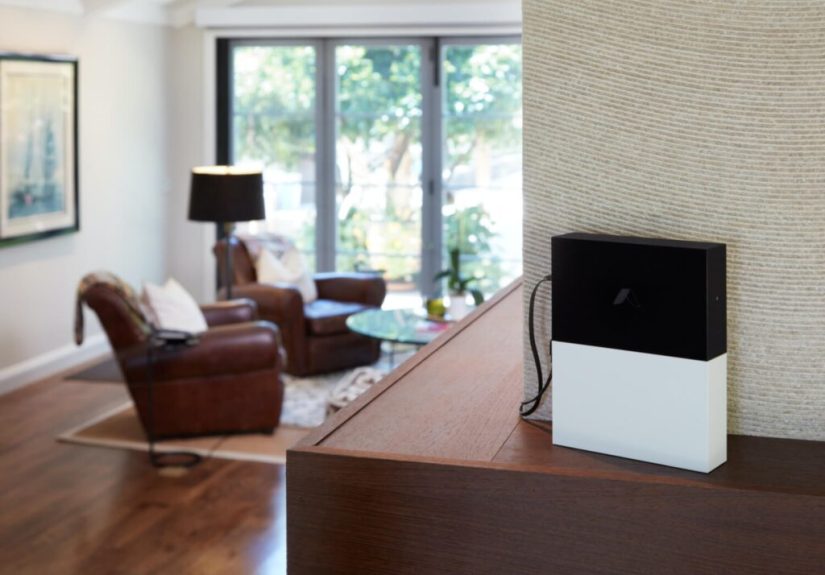
- Smart Security Kit (Smart Security Hub): A more traditional-looking gateway that connects to your router and supports Abode sensors plus a wide range of Zigbee and Z-Wave devices. It doesn’t include a built-in camera, but it’s a potent base for a bigger, more spread-out system.
- Security Hub: A newer, back-to-basics option that focuses on core security features and voice assistant partnerships, but drops some of the advanced local integrations (like HomeKit and certain radio protocols) in favor of a simpler experience. It’s aimed at folks who want a straightforward alarm system with app control and monitoring but don’t care about deep smart-home tinkering.
All three hubs use the same ecosystem of Abode sensors, so upgrading or switching hubs later doesn’t mean starting completely from scratch.
Sensors, Cameras, and Add-Ons
Abode’s hardware lineup covers the essentials plus a few advanced options:
- Door and window entry sensors
- Motion sensors for hallways and main living spaces
- Glass break and vibration sensors for extra protection on large windows
- Key fobs and keypads for arming and disarming
- Smoke and CO listeners and dedicated environmental sensors
- Indoor and outdoor security cameras, depending on the kit and add-ons you choose
Equipment tends to be a bit pricier than some budget competitors, but frequent discounts and sales help soften the blow. Several independent reviewers have noted that Abode’s hardware looks clean, modern, and more “design-conscious” than the clunky gear of legacy alarm companies.
Monitoring Plans and Monthly Costs
The “ongoing cost” question is where DIY alarm systems can either make you smile or cry into your bank app. Abode lands somewhere in the middle, leaning toward budget-friendly on monitoring but not always the cheapest on equipment.
Abode typically offers:
- Self-monitoring (free or very low-cost): You receive push notifications and can check live video, but you’re responsible for calling the police or fire department if something goes wrong.
- Professional monitoring plans: Month-to-month subscriptions that include 24/7 monitoring via a central station and cellular backup. Prices are usually in the mid-$20s per month for the top tier, which is competitive with other DIY systems.
- Short-term monitoring bundles: One of Abode’s unique perks is the option to activate pro monitoring in short burstslike a few days at a time when you’re on vacationrather than committing to a whole month every time.
There are no long-term contracts. If you decide you’d rather self-monitor for a few months and then flip pro monitoring back on during the holidays, you can do that without penalty.
Smart-Home and Voice Assistant Integrations
Here’s where Abode really flexes. Many reviewers rank it among the most flexible smart home security systems, especially if you’re already living in a multi-brand ecosystem.
Depending on the hub you choose, Abode works with:
- Apple HomeKit (supported hubs like iota and older Smart Security hubs)
- Amazon Alexa and Google Assistant
- Zigbee and Z-Wave devices (smart lights, locks, plugs, sensors, and more)
- Popular third-party brands like Philips Hue, Yale, Kwikset, and others
Abode’s CUE automation engine lets you create rules like:
- “When the system is armed away, turn off all the lights and lock the front door.”
- “If the front door opens after 10 p.m., turn on the hallway lights to 30% and start recording on the indoor camera.”
- “If the smoke listener hears an alarm, shut off smart outlets connected to space heaters.”
If you’re the sort of person who gets excited about conditional automations and cross-brand compatibility, Abode plays in a higher league than many “security-first, smart-second” competitors.
Installation and Everyday Use
Abode is a self-install system, which for most people is a plus: no scheduling a tech window, no strangers wandering through your home, and no installation fees.
Setup Experience
Independent testers who have installed Abode’s iota and other kits generally describe the setup as straightforward: plug in the hub, connect it to your network, pair the sensors one by one, and stick them where they belong. Instructions in the app and quick-start guides are reasonably clear, and most users get a basic system up and running the same day.
That said, a few reviewers and customers have reported occasional hiccups:
- Sensors needing a second try to pair
- The app occasionally freezing or lagging on older phones
- Minor confusion when choosing between Wi-Fi and Ethernet for the hub
None of these issues are deal-breakers, but Abode’s app is sometimes rated slightly lower than the very best-in-class apps from competing brands in terms of polish and reliability.
Day-to-Day Living With Abode
Once installed, Abode tends to fade into the background in the best way possible. You arm and disarm via:
- The mobile app
- Keypads or key fobs
- Voice assistants (for supported actions)
- Automations based on phone geolocation or schedules
Notifications are customizable, so you can decide whether you want a ping every time a door opens or only when the system is armed. Integrations mean you can roll security into scenes“Goodnight,” “Vacation,” “I’m Working From Home Today, Please Stop Triggering the Motion Sensor in My Office.”
How Abode Compares to SimpliSafe and Ring
Abode vs. SimpliSafe
SimpliSafe is one of the most popular DIY alarm brands in the U.S., and it’s often the first comparison people make. Here’s the short version from third-party testing:
- SimpliSafe usually wins on ease of use, app ratings, and raw simplicity.
- Abode usually wins on smart-home integrations and advanced automation options.
- SimpliSafe’s hardware is often cheaper per sensor, though Abode can make up ground with lower or more flexible monitoring fees over time.
If you want the most approachable, “no thinking required” setup, SimpliSafe may edge out Abode. If you’re an Apple HomeKit user, already invested in smart locks and lighting, or you want really granular rules, Abode has the advantage.
Abode vs. Ring Alarm
Ring, owned by Amazon, has aggressively priced hardware and one of the broadest camera and doorbell lineups on the market. Compared with Ring:
- Abode usually offers stronger integration with non-Amazon ecosystems and a wider range of third-party devices.
- Ring often wins on camera selection and super-low monitoring costs for combined camera and alarm coverage.
- Abode appeals more to privacy-conscious users who prefer not to park all their security and smart home data inside a single big-tech ecosystem.
Put simply: if you’re already all-in on Amazon and primarily care about cameras, Ring is hard to beat. If you want a more platform-agnostic brain at the center of your home, Abode is the better fit.
Who Is Abode Best For?
Based on hands-on reviews, customer feedback, and feature comparisons, Abode is especially well-suited for:
- Renters and apartment dwellers who can’t drill big holes or run wires everywhere but still want serious security and automation.
- Smart-home enthusiasts who already have a mix of smart locks, lights, and thermostats and want a hub that plays nicely with all of them.
- Apple HomeKit users (with supported hubs) who want a security system that doesn’t treat Apple compatibility as an afterthought.
- People who hate contracts and want the option to switch between self-monitoring and pro monitoring without talking to a retention department.
Abode may not be ideal if you want professional installation, absolutely beginner-proof apps, or the lowest equipment prices on the market. But if you’re willing to spend a bit of time tuning the system, you can build something extremely capable.
Pros and Cons of Abode Security
Abode Pros
- No long-term contracts; flexible month-to-month and short-term monitoring
- Excellent smart-home integrations, including Apple HomeKit on compatible hubs
- DIY installation that’s realistic for most users
- Custom automation engine (CUE) for advanced rules and scenes
- Multiple hub options for different home sizes and needs
- Good fit for renters, small homes, and mixed-brand smart-home setups
Abode Cons
- Equipment can cost more upfront than some rivals
- App experience is solid but not always best-in-class in reliability
- Limited native camera lineup compared with heavyweights like Ring
- Some advanced integrations depend on which hub you choose
Real-World Experiences and Practical Tips
Reviews and spec sheets are helpful, but what does Abode feel like when it’s actually part of your daily routine? Let’s look at some practical scenarios and lessons from real-world use.
Abode in a Small Apartment
Imagine you’re in a one-bedroom apartment: front door, sliding balcony door, a couple of windows, and a small hallway. An iota hub plus a few entry sensors and a single motion sensor can cover most of that with very little visual clutter. You can tuck the hub on a shelf near the living room so the built-in camera and motion sensor watch the main space without extra devices.
With self-monitoring, your monthly cost can be minimal. If you travel, you can bump up to pro monitoring for a month or just for a short-term bundle while you’re away, then drop back down when you return. That flexibility is a big deal if you’re managing a tight budget but still want a safety net.
Abode in a Larger Home With Smart Locks and Lights
In a two-story house, Abode really shines when it’s treated as the central automation brain. You might pair it with smart locks on the main doors, smart bulbs or switches in the entryway and downstairs hall, and a few indoor cameras.
Want some ideas?
- When Abode is armed away, automatically lock all exterior doors and turn off every downstairs light.
- If a door opens after midnight when the system is armed stay, turn on low-level hallway lights so you don’t trip over the dog on your way to the kitchen.
- If a leak sensor or smoke listener trips, cut power to selected smart plugs that might be running risky devices.
These kinds of automations are where Abode feels less like “just another alarm” and more like a smart-home platform that happens to include a full alarm system.
Handling App Glitches and Notifications
No app is perfect, and Abode’s is no exception. A few users mention occasional lag or needing to restart the app if things get weird. The good news is that basic security functionslike the hub’s cellular backup, siren, and sensor communicationdon’t depend on the app being open 24/7.
A couple of practical tips:
- Spend some time fine-tuning notifications so you’re not overwhelmed by pings for every tiny event.
- Test your automations in “Home” mode before trusting them in “Away” mode, so you don’t get startled by surprise sirens.
- Check your hub’s placementgood Wi-Fi or Ethernet and central location can reduce weird glitches and delays.
Customer Support and Learning Curve
Most reviewers describe Abode’s customer support as helpful, especially via chat and email, though some note it may not always be as polished or omnipresent as the largest players in the space. The learning curve is mild for basic use (arm, disarm, respond to alerts) and steeper if you dive into advanced automations.
If you’re the kind of person who enjoys organizing your phone’s home screen just so, building CUE rules will feel like a fun puzzle. If you’d rather never think about “triggers” and “conditions,” you can still use Abode as a straightforward alarm and ignore the deeper features entirely.
Is Abode Worth It?
The honest answer: it depends on what you value most. If you want:
- Solid core security features
- Serious smart-home flexibility
- Contract-free monitoring and DIY installation
…then Abode is absolutely worth a hard look. If you’d rather trade flexibility for the absolute simplest setup and the most polished app experience, a competitor like SimpliSafe might be a better fit. The good news is that in 2025, we’re spoiled for optionsand Abode is firmly in the “top-tier DIY security” conversation.
Conclusion: Is Abode Right for Your Home?
Abode is a strong choice for people who want more than a basic beeping keypad and a couple of sensors. It sits at the intersection of home security and smart home automation, giving you the tools to protect your space and the flexibility to make your home behave the way you want.
It’s not the cheapest hardware, and the app could use a bit more polish, but the depth of integrations, flexible monitoring, and renter-friendly design make Abode especially appealing to smart-home fans, tech-savvy renters, and homeowners who like to customize everything. If that sounds like you, Abode is well worth considering as your home’s next security system.