Table of Contents >> Show >> Hide
- Why Private Messaging in Roblox Feels Different Now
- Method 1: Use the Whisper Command Inside a Roblox Experience
- Method 2: Use Roblox Chat or Party Chat to Message a Connection
- How to Turn On Chat Settings if Roblox Blocks Your Message
- Best Safety Tips for Private Messaging in Roblox
- Common Roblox Private Messaging Problems and Fixes
- Quick Comparison: Which Roblox Private Messaging Method Is Better?
- Conclusion
- Player Experiences: What Private Messaging in Roblox Really Feels Like
- SEO Tags
Need to tell your teammate where the hidden lever is without announcing it to the entire server like a medieval town crier? You’re in the right place. Sending a private message in Roblox is still possible, but the platform has changed a lot, and many older tutorials are now about as fresh as last week’s fries. Today, the easiest ways to private message someone in Roblox are by using an in-game whisper or by starting a direct chat through Roblox’s chat and Party tools.
This guide breaks down both methods in plain English, without the tech fog, robot filler, or weird instructions that make you question whether the writer has ever opened Roblox in their life. You’ll learn how to send a private message in Roblox on desktop and mobile, what settings can block your message, why the chat box sometimes behaves like it’s unionizing, and how to stay safe while chatting. If you just want the quick answer, here it is: use /w inside an experience for a whisper, or use Roblox’s chat and Party tools to message a connection directly.
Why Private Messaging in Roblox Feels Different Now
Roblox has tightened up communication features in recent updates, especially around age checks, privacy controls, and who can chat with whom. So if you’ve seen an old tutorial telling you to hunt for a classic inbox-style message system and fire off DMs like it’s 2018, that advice may not match what you see today. The current Roblox setup focuses more on experience chat, direct chat, and Party chat, with extra limits based on age, region, and account settings.
That sounds a little serious, but the good news is the actual process is still simple. Once your account is eligible for chat and your privacy settings allow it, private messaging mostly comes down to two easy methods. Think of them as the “same server” option and the “outside the game” option.
Method 1: Use the Whisper Command Inside a Roblox Experience
If you and the other player are in the same Roblox server, the fastest way to send a private message is to use the whisper feature. In Roblox language, this is often called direct chat inside an experience. In normal human language, it means you send a message that only the other person should see instead of blasting it into public chat for the whole lobby to enjoy.
How Whispering Works in Roblox
A whisper is basically a private chat message sent during gameplay. It ends when you leave the experience, so it’s perfect for short, in-the-moment communication. Maybe you’re playing an obby and want to tell your friend which route is safe. Maybe you’re in a roleplay game and want to coordinate without ruining the scene. Maybe you just need to say, “Don’t trust the guy in the banana suit,” and frankly that can be mission-critical information.
Steps to Send a Whisper on Desktop
- Join the same Roblox experience and server as the person you want to message.
- Open the chat window by pressing the
/key or clicking the chat icon. - Type
/w Username your message. - Press
Enterto send it.
Example:
/w BuilderBro Meet at the blue door
Some players also use /whisper instead of /w. The short version is quicker, and let’s be honest, most Roblox conversations are happening at the speed of panic anyway.
Steps to Send a Whisper on Mobile
- Open the Roblox experience where you and the other player are currently playing.
- Tap the chat icon to open the chat bar.
- Type the whisper command the same way:
/w Username your message. - Tap send.
On mobile, the hardest part is usually typing the username correctly without your keyboard deciding to freestyle. If the message does not go through, double-check the spelling and make sure you are both still in the same server.
When to Use This Method
- When you are already playing together in the same server
- When you need a fast, one-on-one message during gameplay
- When public chat would spoil a surprise, strategy, or secret
- When you do not want to leave the experience just to chat
Why Your Whisper Might Not Work
If your private message in Roblox refuses to send, the issue usually falls into one of these buckets:
- Chat is not enabled for your account: Roblox now uses age checks and communication settings for chat access.
- The experience does not support chat the way you expect: Some developers disable or customize chat features.
- Your privacy settings are blocking direct chat: If direct chat is off, the whisper feature may not work.
- You are not in the same server: Whispers only work inside the current experience session.
- The message got filtered: If Roblox thinks part of your message includes restricted language or personal information, it may show up as hashtags or fail to send as expected.
If you see a wall of hashtags, Roblox did not suddenly become a fan of dramatic censorship aesthetics. It usually means the platform’s chat filter blocked part of the message.
Method 2: Use Roblox Chat or Party Chat to Message a Connection
If the person is not in your current game, or you want to keep chatting after you leave the experience, the better option is Roblox’s direct chat and Party system. Roblox now uses the term connections for people on your list, but if you still think of them as friends, nobody is going to blow a whistle.
This method is the modern “message someone directly” option. It works better for longer conversations, checking whether someone is online, or planning what to play next. It is also handy when whispering is impossible because you are not in the same server.
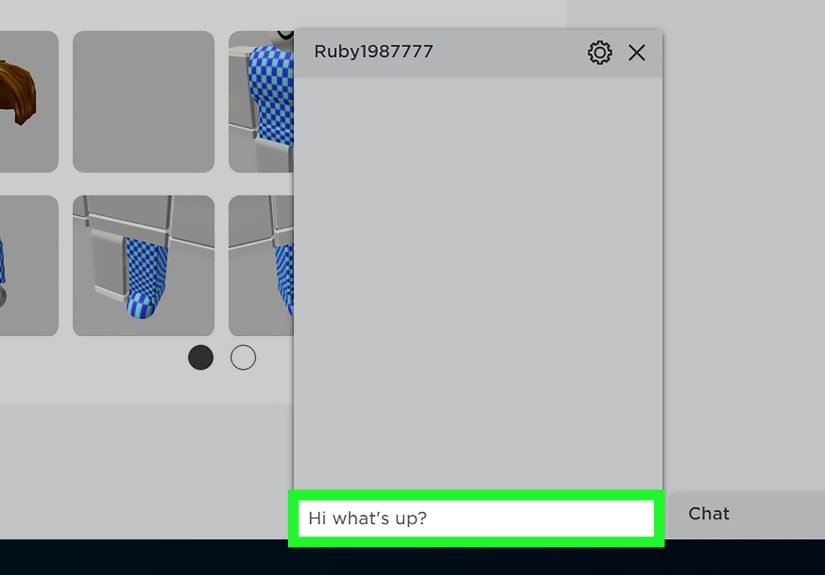
How to Send a Direct Message on Roblox Web
- Log in to Roblox on your computer.
- Look for the chat box in the lower-right corner of the screen.
- Click it to open your chat list.
- Select the connection or group you want to message.
- Type your message into the Send a Message field.
- Press
Enter.
This is the easiest way to send a private Roblox message from a browser. It feels more like standard messaging, and it is less chaotic than trying to whisper mid-jump in a parkour game while your avatar is one bad landing away from respawning into shame.
How to Send a Direct Message in the Roblox App
- Open the Roblox app.
- Go to the Party tab or open the chat area.
- Select an existing chat or tap the + icon to start a new one.
- Choose the connection you want to message.
- Type your message and send it.
You can also create a group chat if you want to coordinate with multiple people. Roblox supports small group conversations, which is useful when your squad is trying to decide between horror, tycoon, or “the game one person is obsessed with and everyone else barely understands.”
When This Method Makes the Most Sense
- When you want to message someone outside your current experience
- When you want to continue a conversation after leaving a game
- When you need a direct message that is not tied to one server session
- When you want to create a group chat for planning or coordination
How to Turn On Chat Settings if Roblox Blocks Your Message
If you cannot send a private message in Roblox, your account settings may be the real villain. Roblox chat tools are now tied to communication settings, age checks, and in some cases parental approval. That means a perfectly typed message can still go nowhere if the feature is disabled.
For Regular Users
Go into your account settings and look for the communication or privacy section. Depending on your device, the menu wording may vary a bit, but the goal is the same: make sure Experience chat and, if available, Direct chat or Party chat are turned on for your account.
For Parents or Caregivers
If a child’s account is linked to a parent account, the parent can manage communication options through Parental Controls. This is where settings for Experience chat, Experience direct chat, and Party can be reviewed. In plain terms, this is the control panel that decides whether a child can whisper in-game, message directly, or join chat groups.
That may sound restrictive, but it is actually useful. It gives families a way to match Roblox chat features to the child’s age and comfort level instead of leaving everything wide open and hoping the internet behaves like a polite school assembly.
Best Safety Tips for Private Messaging in Roblox
Private does not mean invisible. Roblox still moderates communication, filters certain language, and allows players to block or report bad behavior. So even when you are whispering or messaging in a one-on-one chat, it is smart to keep things safe and simple.
- Do not share personal information such as your real name, address, school, phone number, or passwords.
- If someone makes you uncomfortable, block and report them instead of arguing back.
- Use private messages for game coordination, not for moving conversations off-platform.
- Teach younger players to chat only with people they know or trust.
- Remember that filtered chat can block risky or inappropriate content automatically.
The golden rule is easy: if you would not shout it in a crowded game lobby, maybe do not whisper it either.
Common Roblox Private Messaging Problems and Fixes
Problem: I typed /w and nothing happened
Make sure the other player is in the same server, verify the username spelling, and confirm that direct chat is enabled for your account.
Problem: I can open chat, but I cannot message a specific person
That usually points to privacy settings, age-based chat limits, or the other user’s settings blocking who can contact them.
Problem: My message turns into hashtags
Roblox filtered part of the message. Rewrite it more simply and remove anything that sounds like personal information, inappropriate language, or restricted terms.
Problem: I cannot find the old Roblox messages page
Current Roblox chat features are built more around in-experience direct chat and Party/chat tools than the old-school message style many older guides describe. So if a tutorial tells you to click something that does not exist anymore, it is probably the tutorial that is broken, not your brain.
Quick Comparison: Which Roblox Private Messaging Method Is Better?
Use whispering with /w if you need a fast private message during live gameplay in the same server.
Use direct chat or Party chat if you want to message a connection outside the game, keep chatting after you leave, or make a small group conversation.
For most players, the best choice depends on one question: are you already in the same experience right now? If yes, whisper. If no, use Roblox chat or Party.
Conclusion
Sending a private message in Roblox is still easy once you know where the platform moved the furniture. The two simplest options are whispering with /w inside a game and using Roblox’s direct chat or Party tools outside the game. The first is perfect for quick, secret-in-plain-sight coordination. The second is better for ongoing conversations with your connections.
The biggest thing to remember is that Roblox communication now depends more on account eligibility, age checks, privacy settings, and parental controls than it used to. So if private messaging is not working, it is usually not because you forgot how to type. It is because a setting, restriction, or filter is getting in the way. Once that is sorted out, messaging becomes much easier.
In other words, yes, you can still send a private message in Roblox. You just need the right method, the right settings, and maybe a little patience when autocorrect decides your friend’s username should become a vegetable.
Player Experiences: What Private Messaging in Roblox Really Feels Like
One of the funny things about private messaging in Roblox is that most players do not realize how useful it is until public chat becomes complete chaos. It usually starts with something small. You are in a crowded server, everyone is typing at once, somebody is roleplaying as a king, somebody else is selling mystery pets, and you are just trying to tell your friend which tunnel leads to the treasure room. That is the exact moment private messaging suddenly feels less like a bonus feature and more like a survival tool.
For a lot of players, the first real experience with Roblox whispering happens during team-based games. Maybe you are playing a defense game and need to tell one teammate to guard a side entrance. Maybe you are in a social deduction game and want to compare notes without broadcasting your entire theory to the people you are suspicious of. A whisper lets you do that quietly and quickly. It feels smooth when it works, because it keeps the game moving without dragging you out into a menu maze.
Then there is the mobile experience, which is honestly a little more chaotic but still useful. On a phone or tablet, private messaging can feel like trying to text while riding a roller coaster, especially if you are moving around in-game at the same time. Still, once players get used to opening chat, typing /w, and firing off a fast message, it becomes second nature. A lot of younger players use it to ask simple things like, “Where are you?” “Did you already finish the quest?” or “Meet me by spawn.” It is not glamorous, but it gets the job done.
Outside the game, Roblox chat and Party tools create a different kind of experience. This is where private messaging feels more relaxed. Instead of reacting in the middle of gameplay, you are planning. Players use it to ask friends if they are online, decide what game to join next, or gather a small group before starting a session. It has a more organized feel, especially for people who hop between games a lot. In that sense, it works less like a secret note passed across a classroom and more like a pregame huddle.
There is also a practical side that players appreciate once they run into trouble. When public chat gets too noisy, filtered, or distracting, private messaging feels cleaner. When someone in a server is being annoying, a whisper to your actual teammate can save you from turning the whole chat into a drama club audition. And when a younger player has parents managing communication settings, private messaging can become a helpful way to keep interactions focused on known friends or approved connections rather than random strangers.
Of course, the experience is not always perfect. Sometimes the filter blocks a totally innocent message and turns it into enough hashtags to look like a trending topic. Sometimes a player finds out their account settings do not allow direct chat and has to stop everything to fix it. Sometimes a username is so oddly spelled that sending one whisper feels like entering a Wi-Fi password from 2007. But once those bumps are handled, private messaging becomes one of the simplest tools on the platform.
In everyday Roblox play, that is really the story: private messaging is not flashy, but it is incredibly useful. It helps friends coordinate, helps teammates plan, helps families keep communication more controlled, and helps players avoid turning every thought into a public announcement. And in a game platform filled with noise, that kind of quiet convenience is a bigger deal than it sounds.